Model reference United States

Milwaukee
by the model.

Read the selected drill and sander references by tool family. Model, market, package and manual limits are preserved separately.

Identify your tool

Drills

Explore the collection

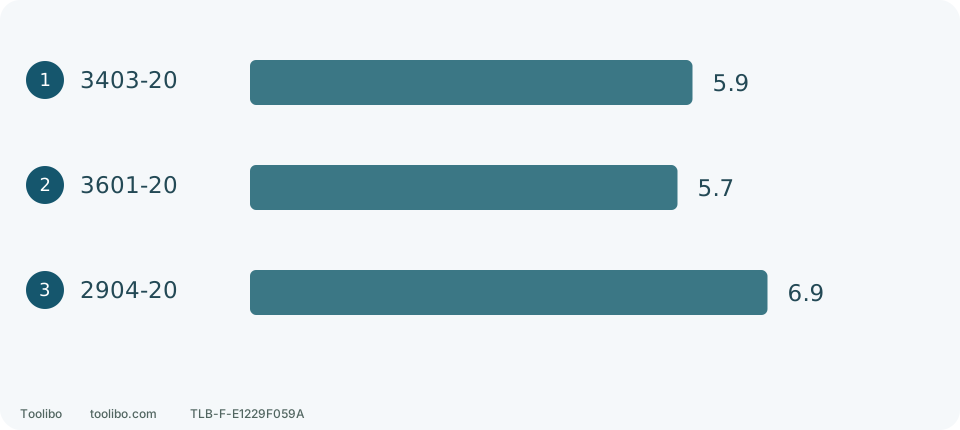
Published tool lengths in inches

Bars share a zero baseline. Add actual bit projection, grip, battery envelope and any required side handle before judging access.

  • 3403-20Cordless drill/driver

    • M12
    • M12 FUEL drill/driver; no hammer mode.
    • 3403-20 — US listing
  • 3601-20Cordless drill/driver

    • M18
    • M18 Compact Brushless drill/driver; this listing is not branded FUEL.
    • 3601-20 — US listing
  • 2904-20Cordless hammer drill/driver

    • M18
    • M18 FUEL hammer drill with AUTOSTOP control and a side handle.
    • 2904-20 — US listing
  1. 1 · 3403-20

    5.9 in

  2. 2 · 3601-20

    5.7 in

  3. 3 · 2904-20

    6.9 in

Bars share a zero baseline. Add actual bit projection, grip, battery envelope and any required side handle before judging access.

Original Toolibo comparison diagram. Generic symbols; no manufacturer photographs or service artwork.

Cordless drill/driver

3403-20

The Milwaukee 3403-20 is listed in the US as the M12 FUEL 1/2-inch Drill/Driver. Milwaukee describes a brushless motor, an all-metal chuck, and a mechanical clutch. This documentation-based introduction explains the model identity and points owners to its operating instructions; it does not rate performance or durability. The operator manual also covers the 3404-20, so follow the sections labeled for your model. For service identification, the linked 3403-20 parts bulletin lists starting serial M79A.

Model, manuals & limits

Cordless drill/driver

3601-20

Milwaukee identifies 3601-20 as the M18 Compact Brushless 1/2-inch Drill/Driver. The US listing used here is 3601-20. Two speeds; variable trigger; torque-selector collar; no hammer mode.

Model, manuals & limits

Cordless hammer drill/driver

2904-20

Milwaukee identifies 2904-20 as the M18 FUEL 1/2-inch Hammer Drill/Driver. The US listing used here is 2904-20. Two speeds; mechanical clutch; hammer mode; AUTOSTOP bind-up over-rotation control; side handle.

Model, manuals & limits

Read the comparison

Milwaukee 3403, 3601 and 2904: three practical buying choices

Existing M12 small-hole users can start with 3403; tight-access M18 users with 3601. Larger wood holes or suitable masonry can justify 2904 bulk.

Explore the differences

More guides for this brand

Choose a specific model, control or documentation question.

  • External care and service boundaries

    Aim for a dry grip, unobstructed vents and clean controls. Cracks, binding and an unreliable switch need more than cleaning.

  • When your drill won’t start

    Exclude danger and damage, check centre lock and battery retention, then interpret the exact model. On 3403/3404, one light flashing four times, eight times and a hot-pack indication are not interchangeable.

  • Match the right manual

    Record model, Type/service identifier, market and document revision separately. Download availability today does not automatically establish applicability to your unit.

  • Drill, drive or hammer?

    3403-20 has drilling and clutch driving; 3404-20 adds hammer drilling. Mode, mechanical gear and trigger speed are separate settings.

  • Plan for drill reaction

    On 2904-20, engage the handle hooks in the gear-case ring slots and tighten the grip. If walls or clamps prevent safe two-hand clearance, change the setup rather than remove the required handle.

  • 2904 AUTOSTOP and grip

    AUTOSTOP retains its last setting after a battery change. Keep the side handle securely fitted and never deliberately jam a bit to test protection.

  • 3403 clutch and mode

    Use mechanical speed 1 and numbered clutch settings for a screw-driving trial. The drill symbol is for drilling, not finer clutch adjustment. 3403-20 does not have 3404-20 hammer action.

  • 3403 or 3404?

    Choose furniture, wood and metal work by access and complete cost; hammer mode helps only when material, hole size and site conditions suit it.

  • 3601 compact setup

    Measure the actual accessory and battery envelope. Drive screws in low range; withdraw, stop and remove the battery before changing bits, rather than working on a powered drill in the gap.

  • 3601 or 2904?

    Consider 3601 for small holes, assembly and restricted access; choose 2904 when larger wood holes or suitable masonry justify its size and weight.

  • Choose M12 or M18

    Existing equipment can avoid duplicate purchases, not replace capability checks. The 48-59-1812 charges both families but does not make their packs interchangeable.

  • Milwaukee service identity

    Record full catalog and serial numbers, then compare the bulletin header and date; an R filename does not replace revision matching.

  • Milwaukee kit contents

    3403 pairs 4Ah with 2Ah, 3601 supplies two 2Ah packs, and 2904 two 5Ah packs. Deduct usable equipment already owned before comparing complete cost.

Identify your tool

Sanders

Explore the collection

Two abrasive systems, different preparation

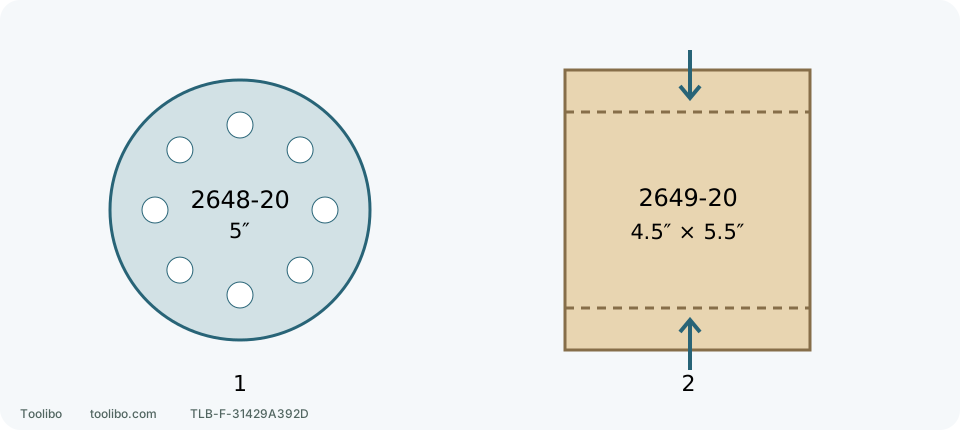
The disc needs matching backing and dust holes. The sheet needs clamping allowance, tension and the supplied hole punch. Dashed lines illustrate clamping ends, not a cutting or folding template; sheet dimensions are not effective pad contact dimensions.

  • 2648-20Random-orbit sander

    • 5-inch random-orbit pad; 3/32-inch orbit.
    • 7,000–12,000 OPM; six-position dial, without a per-position OPM table.
    • Hook-and-loop pad; separate PSA-pad arrangement described in the manual.
  • 2649-20Orbital quarter-sheet sander

    • Orbital quarter-sheet tool; 1.6 mm orbit.
    • 11,000–13,000 OPM.
    • Clamp-on 4.5 × 5.5-inch paper; matching punch required for dust holes.
  1. 1 · Disc preparation

    Choose the correct hook-and-loop disc; PSA requires its own approved pad.

  2. 2 · Sheet preparation

    With battery removed, secure front, tension and secure rear, then use the matching punch.

The disc needs matching backing and dust holes. The sheet needs clamping allowance, tension and the supplied hole punch. Dashed lines illustrate clamping ends, not a cutting or folding template; sheet dimensions are not effective pad contact dimensions.

Original schematic and editorial comparison; no OEM image or diagram reproduced.

Read the comparison

Milwaukee 2648-20 versus 2649-20: broad panels, straight edges and abrasive costs

For open broad surfaces, consider the 2648-20 first. For grain-parallel refinement near straight boundaries and a quarter-sheet workflow, examine the 2649-20. Neither should be tipped onto an edge to dig into corners.

Explore the differences

More guides for this brand

Choose a specific model, control or documentation question.

  • Pad rotation and pressure

    These descriptions lead to different checks. Separate motor sound, visible motion and surface change rather than testing with more pressure or lifting a suspect tool to run unloaded.

  • Old-wood hardware inspection

    Follow a reclaimed shelf across faces, edges, joints and bracket backs, then separate removable fittings from unresolved hardware.

  • Match your sander manual

    A familiar brand and colour are only a start. Match body, market, document revision and task section before keeping a file for your machine.

  • Read abrasive labels

    Two packets marked 120 may suit different stages and different pads. Read the complete label before deciding whether to buy it, fit it and use it on this material.

  • Inspect and replace discs

    Slower sanding is not a reason to press harder. Stop and inspect the abrasive: loading, wear, tears and failed attachment lead to different next steps.

  • Trace swirl marks safely

    Small loops and hooked scratches are a reason to inspect the setup, not immediately reach for finer paper. Where the marks appear can help you decide what to check first.

  • Check uneven sanding

    A smooth-feeling board is not necessarily flat. Separate changes in shape from changes in colour or scratch pattern before sanding one patch again.

  • Collector emptying workflow

    Separate half-full, coating-dust and end-of-work triggers for 2648, PCL401 and PCL406.

  • Backing-pad inspection

    The disc is the abrasive consumable; the backing pad supports and holds it. Inspect more than adhesion: a damaged edge, separated layer or torn extraction hole can matter even when a disc still sticks.

  • Heat or vibration: stop

    Use the last change to organise disconnected checks. Damage, severe symptoms and unexplained changes are not reasons for repeated restarts.

  • 2648-20 speed trial

    Compare speed on matching material while holding abrasive and technique constant, using this model's contact-before-start sequence.

  • 2648-20 vacuum connection

    Remove the battery and dust box, push in the adapter and twist the hose secure, then check seating, clearance and full-stroke hose pull.

  • 2648-20 replacement discs

    The standard hook-and-loop pad is 51-36-7100. Match a suitable 5-inch hook-and-loop disc and its eight dust holes; PSA adhesive discs require the correct separate pad.

  • 2649-20 paper clamps and punch

    Fit 4.5×5.5-inch paper using the front clamp and side-operated rear clamp, with approximate metric dimensions, supplied punch alignment and final acceptance.

  • Parts list or operator manual

    Number 30 beside a drawing is not necessarily an orderable part number. A Milwaukee 2648-20 dust-box example separates document version, illustrated item and service assembly.

  • Hook-and-loop or PSA

    Equal diameter and grit do not make two backings interchangeable. Inspect the actual pad before buying; adhesive is not a repair for worn hooks.

  • Mesh and pad protectors

    A thin protector protects the backing pad; a thick interface changes conformity. A specific Festool 125 mm example shows the parts and their order.

  • Wood abrasive construction

    Define the surface and method before choosing grain. A flexible hand sheet and a machine disc can share a grit number without being interchangeable.

  • Store and label sanding discs

    Sort discs by backing, grade and condition, keep useful labels and inspect stored abrasives before the next job.

  • Inspect dust escape

    Record where dust appeared, then stop and inspect that component. A torn bag, unlatched lid and poor pickup beneath the pad are different problems, not reasons to tape every seam.

  • Disc will not stay attached

    Do not add glue to a disc that lifts or has come off during use. Disconnect power and compare it with one new, correctly matched disc before replacing parts.

  • Investigate disc tears

    Do not keep fitting fresh discs and hoping. Match the tear, the disc condition before fitting and the work route to separate contact damage, damaged consumables and attachment problems.

  • Hot or scorched work

    A discoloured patch and a smoking housing, battery or collector need different responses. Stop safely before deciding which checks apply.

  • Check reduced extraction

    When dust suddenly increases, recall what changed last. New-disc holes, a lid refitted after emptying and a replacement hose connection deserve attention before blaming an internal fan.

  • Abnormal pad behaviour

    A random-orbit pad is not a fixed-speed disc. Unfamiliar motion, vibration or stopping behaviour calls for taking it out of use, not pressing harder, touching the pad or sanding more wood to decide.

  • External sander cleaning

    A component-specific routine for Milwaukee 2648 and RYOBI PCL406, without transferring housing-cleaning permission to filters.

  • Sander storage and local carrying

    Prepare Milwaukee 2648 and RYOBI PCL406 for storage, then separate tool, battery, abrasive and collection accessories.

  • Prepare a service request

    Service needs the exact tool, what happened and what remains unknown. Organize existing facts without dismantling or reproducing a fault for video.

  • Smoke, sparks or smell

    Address immediate danger, then keep the tool out of use and arrange the appropriate assessment and handling route.

The reading behind this guide

Source records describe the evidence used for this guide. Original manufacturer files and external videos are not provided here.

Sources & references.

Manufacturer documents and public safety references are the starting point. Check each source’s scope and confirm the exact model, market, and revision for your tool.

  1. Milwaukee Tool: 3403-20 US product listing

    Checked

    Document checked

    Listed at check time; not a stock check, discontinuation audit, or claim to be newest generation.

  2. Milwaukee Tool: 3403-20/3404-20 operator manual 58-14-3400d2 58-14-3400d2

    Revision 09/22; 58143400d2; 961014300-02(A) · Checked · Pages Full20-page PDF downloaded. Printed3 capacities and RPM/BPM; BPM table No Load versus symbol Under Load condition conflict retained, not equal-load ranking.

    Document checked

    Only 3403-20 and 3404-20. Indicators and control behavior must not be generalized to Bosch or other drills.

  3. Milwaukee Tool: 3601-20 US product listing

    Checked

    Document checked

    Listed at check time; not a stock check, discontinuation audit, or claim to be newest generation.

  4. Milwaukee Tool: 3601-20/3602-20 operator manual 58-14-9845d2

    Checked · Pages Full16-page PDF downloaded; printed3 bit-specific capacities and3601/3602 mode separation.

    Document checked

    Printed code 58149845d2 / 961014655-02(A), 02/23; English/French/Spanish; shared with hammer model 3602-20.

  5. Milwaukee Tool: 2904-20 US product listing

    Checked

    Document checked

    Listed at check time; not a stock check, discontinuation audit, or claim to be newest generation.

  6. Milwaukee Tool: 2903-20/2904-20 operator manual 58-14-9998d1

    Checked · Pages Full11-spread PDF downloaded; printed3 on PDFpage2 capacities; side handle and AUTOSTOP operating boundaries.

    Document checked

    Printed code 58149998d1 / 961014344-01(B), 01/22; English/French/Spanish; 2903-20 is non-hammer sibling.

  7. Milwaukee Tool: 3403-22 US kit listing

    Checked

    Document checked

    Pack contents are specific to this listing; do not decode all suffixes from these examples.

  8. Milwaukee Tool: 3601-22CT US kit listing

    Checked

    Document checked

    Pack contents are specific to this listing; do not decode all suffixes from these examples.

  9. Milwaukee Tool: 2904-22 US kit listing

    Checked

    Document checked

    Pack contents are specific to this listing; do not decode all suffixes from these examples.

  10. Milwaukee Tool: 3403-20 service parts bulletin 54-06-2260 54-06-2260

    Checked

    Document checked

    Do not present the bulletin's internal service procedures as owner maintenance. Confirm catalog and serial applicability before using parts information.

  11. Milwaukee Tool: 3601-20 service parts bulletin 54-06-2995, revised file

    Checked

    Document checked

    July 2025; starting serial N66A. The printed bulletin number omits the filename R suffix; confirm the bulletin and full tool identity before selecting parts.

  12. Milwaukee Tool: 2904-20 service parts bulletin 54-24-2990, revised file

    Checked

    Document checked

    May 2025; serial field M64A; printed bulletin number omits filename R.

  13. Milwaukee Tool: 2648-20 US product listing

    Checked

    Document checked

    US listing identity and published specifications only; package contents and availability may change.

  14. Milwaukee Tool: 2648-20 operator manual 58-14-0097d2; 961012494-02(A)

    Revision 11/21 · Checked · Pages Cover; English 3–7; back cover

    Document checked

    Applies to the named US body and checked revision; not proof of every serial or regional version.

  15. Milwaukee Tool: 2648-20 J49A service parts list 54-38-2600

    Revision June 2023 · Checked · Pages 1–2

    Document checked

    Identification evidence only; internal drawings do not authorise owner repair.

  16. Milwaukee Tool: 2648-20 J49B service parts list 54-38-2601

    Revision June 2023 · Checked · Pages 1–2

    Document checked

    Identification evidence only; internal drawings do not authorise owner repair.

  17. Milwaukee Tool: 2649-20 US product listing

    Checked

    Document checked

    US listing identity and published specifications only; package contents and availability may change.

  18. Milwaukee Tool: 2649-20 operator manual 58-14-0259d2; 961014307-02(A)

    Revision 03/22 · Checked · Pages Cover; English 3–6; back cover

    Document checked

    Applies to the named US body and checked revision; not proof of every serial or regional version.

Find your next answer.

Search guide titles, summaries, brands, and model names.

Tab to a result · Enter to open · Esc to close