
Loading, wear and tears
These examples can overlap; each calls for a different inspection after replacing the disc.
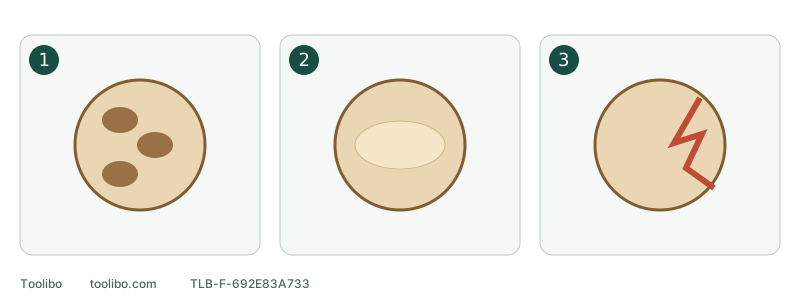
1. Loaded abrasive
Packed residues fill the spaces between abrasive grains.
2. Worn smooth area
A smooth worn patch no longer resembles the surrounding abrasive.
3. Torn backing
A split backing is damage, not a cleaning problem.
These examples can overlap; each calls for a different inspection after replacing the disc.
Disconnect before inspecting
Switch off, wait for the disc to stop and unplug or remove the battery. Handle dust using the controls appropriate for the material. Do not blow with your mouth, beat the disc or use compressed air just to expose the grit. Unknown old coatings or uncertain materials need assessment, not an experimental pass with fresh paper.
Describe what changed: less removal, a hot abrasive, a lifting edge or a tear? Tool odour, unusual vibration or smoke requires a stop and inspection, not an immediate restart after a disc change.
Distinguish three visible conditions
Swipe or scroll horizontally to see all columns.
| Condition | What you may see | Next step |
|---|---|---|
| Loading | Powder, resin or coating residue fills spaces between grains or forms patches | Fit a correct fresh disc for comparison and check material and extraction |
| Wear | Smooth, polished or unevenly worn areas | Replace instead of compensating with pressure |
| Tearing or separation | Split edges, torn backing or layers coming apart | Retire the disc and inspect fit and contact path |
Conditions can overlap. Extra pressure on a loaded disc may also damage its backing. Colour alone does not identify a residue or diagnose the sander.
Check four things during replacement
- Verify the actual grit needed at this stage using the marking or packaging, not face colour.
- Match size and attachment to the fitted pad. Hook-and-loop and PSA are different systems; follow the model’s adhesive-paper removal instructions where relevant.
- Remove permitted loose debris, centre the new disc and align extraction holes. Failed attachment must be corrected without running the tool.
- Check that the collector or specified external system has been maintained and reassembled properly. Blocked airflow and worn abrasive are separate problems.
Confirm that both tool and abrasive suit the material before continuing. Do not turn a dry-sanding tool into a wet-sanding setup to reduce loading. Unapproved solvents may harm backing, adhesive or pad material.
If a fresh disc loads rapidly
Stop using successive discs as the remedy. Check whether the coating or adhesive has reached its stated sandable condition and whether the abrasive is intended for that material. A product’s cure conditions matter; there is no universal one-day waiting rule.
Check the dust-hole path and collection, excessive pressure and repeated dwell. Correct an identifiable external factor and note that change. Changing grit, speed and material simultaneously makes the comparison hard to interpret. Suitable scrap of known ordinary wood can help; unknown coatings still require assessment first.
Decide whether to continue
With secure attachment and working collection, a suitable sample that does not quickly load or develop abnormal heat supports returning to the appropriate process. Inspect periodically rather than waiting for complete loss of cutting.
Repeated tearing in one location points the inspection toward the contact edge and pad. Failed holding points toward the attachment system. Persistent unusual heat, smell or vibration means keep the tool out of use and arrange inspection.
Record material and coating, tool identity, full disc designation and grit, the old disc’s condition, one correction and the new result. This is more useful than deciding that an abrasive brand simply lasts poorly.
Models referenced