
Where the sanding marks appear
Wide coverage, starting points and edges suggest different first checks.
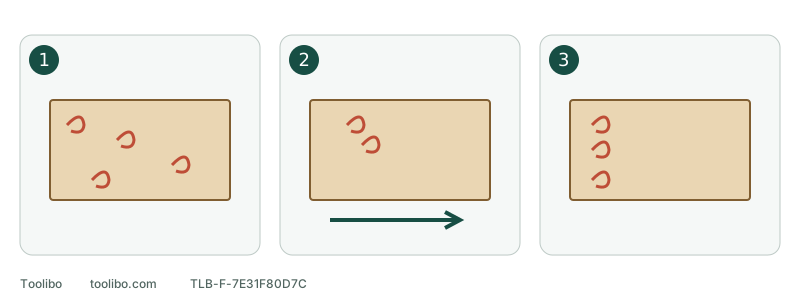
1. Marks across the surface
Check contamination and the actual grit first.
2. Start-point marks
Check the model’s start sequence and flat contact.
3. Marks along an edge
Check pad tilt, dwell and workpiece support.
Wide coverage, starting points and edges suggest different first checks.
Stop and look at the pattern
Switch off, wait for the disc to stop, and unplug the tool or remove its battery. Remove loose dust using a method suitable for the material. Inspect under consistent raking light. A scratch revealed by moving the lamp was not necessarily made by the most recent pass.
Record where the marks occur, whether they existed before the disc change, and what changed most recently. Annotating a photograph avoids marking an unfamiliar finished surface. Treat the pattern as a starting clue, not a bearing diagnosis.
Swipe or scroll horizontally to see all columns.
| Pattern | First checks | Avoid |
|---|---|---|
| Across most of the surface | Trapped grit, the wrong grade, debris beneath the disc | Increasing pressure or speed immediately |
| Around each starting point | The model’s start sequence and whether the pad lands tilted | Repeated practice starts on the finished piece |
| Along edges or in one patch | Tipped pad, repeated dwell, unstable support | Chasing the scratch with the disc edge |
Check both sides of the abrasive
Remove the disc. Look for embedded particles, tears and worn patches on the working face, then inspect the backing for debris that could hold part of the disc proud. Check the actual grit marking against its packaging; a previously used coarse disc can easily return to the wrong stage.
Separate usable discs by grade and protect their working faces from contamination. Deep marks remaining after a change to fine abrasive may be earlier scratches that were never removed. Before trying to erase them, establish whether enough material remains. Removing every mark is not worth sanding through a veneer.
Check the pad and extraction path
Inspect the hook surface, edges and extraction holes. Use only the cleaning method allowed for the tool. Milwaukee permits light cleaning of the 2648-20 hook-and-loop pad with a small brush; that is not permission to use solvents, a scraper or compressed air.
Fit a new, known-compatible disc centrally, with extraction holes aligned. Its perimeter should lie flat, without folds or lifted sections. If the new disc will not stay attached, resolve the attachment problem before running the tool. Check that the collector is closed and the specified connection is seated. A running extractor does not establish airflow at the sanding face.
Keep the pad supported
Secure the workpiece and move the pad over a surface that supports it. Tilting onto an edge to chase one mark can create a hollow. Guide the tool instead of pushing your body weight through it.
Use the start and stop sequence for the exact model. The RYOBI PCL406 starts on the work and must stop completely before being lifted; do not transfer that sequence to a sheet or belt sander. New wobble, unusual noise or a loose disc means stop, not proceed to a sanding test.
Compare on suitable scrap
Use secured scrap of the same known material and similar surface condition, suitable for dry sanding. Fit the correct fresh abrasive and keep grade and travel pattern stable while judging the one correction. Remove dust appropriately and inspect under the same raking light.
If the sample looks sound but the original still shows deep marks, consider its earlier scratches and remaining thickness. If the same marks continue on the sample, especially with unusual vibration, stop sacrificing material and arrange inspection. Unknown coatings and surfaces of uncertain thickness are not diagnostic test pieces.
Models referenced