
Match each model to its own document row
The document-number and revision pairs identify the examples; round and square icons distinguish systems without depicting exact pad geometry.
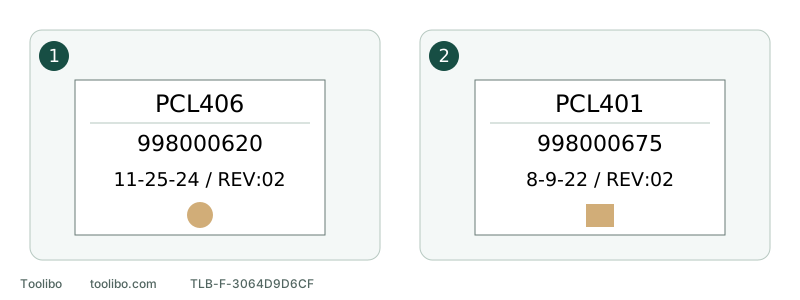
1. PCL406
998000620, REV:02 dated 11-25-24; use its own disc and collection sections.
2. PCL401
998000675, REV:02 dated 8-9-22; use its own paper and punch sections.
The document-number and revision pairs identify the examples; round and square icons distinguish systems without depicting exact pad geometry.
Step one: record the body safely
For smoke, continuing abnormal heat, leakage or a hazardous battery, do not approach, touch or remove anything to identify the model. Move away and seek suitable assistance. Only when equipment is stable and safe to approach should you stop according to its requirements, wait for all movement to cease and safely isolate power before reading external labels.
Record complete body model, suffix, Type if present, full serial information, rated power and known sales market. Preserve readable fragments of a worn label without guessing missing characters or opening the housing. Keep the order/package name separately to explain its relationship to the body.
A box without a readable tool label can start a candidate search, not establish a confirmed match. Record known modifications or replaced accessories on used tools; original packaging does not prove unchanged configuration.
Step two: use the official product entry
Search the manufacturer’s corresponding-market page with the complete identifier. Separate the operator manual from parts lists and brochures. A parts diagram identifies components but does not replace switching, fitting, cleaning and safety instructions.
The selected RYOBI PCL406B and PCL401B sales entries correspond to manuals headed PCL406 and PCL401 respectively. That specific relationship is not a rule allowing suffix deletion for every brand. Tools, batteries and chargers can have separate manuals; match each rather than treating charger indicators as sander controls.
If a search snippet or third-party copy supplies a filename, return to the exact official entry where possible. A PDF icon and familiar brand in a title are not enough to follow its steps.
Step three: match each body to its revision
These are two identified US-market examples, preserving each document’s printed date. They illustrate matching, not universal coverage of all serials or regions.
Swipe or scroll horizontally to see all columns.
| Body and selected sales entry | Internal document number | Printed date/revision | English operation and illustration locations |
|---|---|---|---|
| PCL406; PCL406B sales entry | 998000620 | 11-25-24, REV:02 | Operation printed 6–8; disc and dust collection 7, operation/brake 8; illustrations 10 |
| PCL401; PCL401B sales entry | 998000675 | 8-9-22, REV:02 | Operation printed 6–9; clamped/PSA paper and punch 7; illustrations 10–11 |
Both English maintenance sections are printed page 9. Document and revision identifiers also appear on the back cover. Numbers in a filename are not a substitute for reading that identification. A recent webpage or download does not rewrite the printed date.
Step four: enter the actual task through the contents
For clamped-paper fitting on PCL401, first confirm PCL401 on the cover, then the appropriate heading on English printed page 7 and the accompanying illustration on printed page 10. PCL406 also discusses abrasive fitting on page 7, but its hook-and-loop round-disc instructions do not transfer to a clamped-sheet machine.
For PCL406 extraction connections, start with its page 7 dust section and referenced figures, including adjacent isolation, material and dust warnings. An isolated connector image can omit when to remove the battery, which connection is permitted or what materials are excluded.
Milwaukee 2648-20 and 2649-20 likewise have separate manuals and different pad systems. Adjacent model numbers do not prove common procedures. If the pictured controls do not match your machine, stop to verify identity rather than accepting appearance alone.
Step five: distinguish printed and viewer pages
A multilingual PDF often places language sections consecutively and groups illustrations near the end. The viewer’s tenth screen need not be the illustration bearing printed number 10. Locate through contents and printed footer first; record the viewer position as an additional convenience.
A useful note is “PCL401, 998000675, REV:02, English printed 7, illustration printed 10.” It is easier to verify than “page seven” and avoids another language’s identically numbered page without its needed figure.
Do not splice contradictions into a new answer
PCL401 sales information labels speed 14,000 OPM, while this manual’s printed page 6 says 14,000 r/min (RPM). PCL406 also has a cross-language orbital-size conversion discrepancy. Do not conceal differences by averaging, deleting units or borrowing an adjacent model’s data.
If a difference affects selection or operation, keep exact model, document, page and conflicting wording for manufacturer clarification. Unclear critical startup or accessory-fit requirements mean pausing affected powered operations or purchases until resolved, not repeatedly running the machine to decide which passage seems plausible.
Save a record you can use again
Keep the official file location, body identity, market, document and revision, plus the relevant section and figure pages. Mark confirmed and unresolved fields separately. Recheck after changing pad, tool or regional configuration.
If no file matches, send the manufacturer a specific question: “Body …, candidate document …, control/power/accessory differs at … . Please confirm applicable instructions.” Do not dismantle or run the tool to make photographs resemble a manual. Success is matching complete instructions to the actual equipment and task, not merely downloading a same-brand PDF.
Models referenced