
Three areas of the backing pad
A sound fastening face does not rule out separated layers or damaged hole edges.
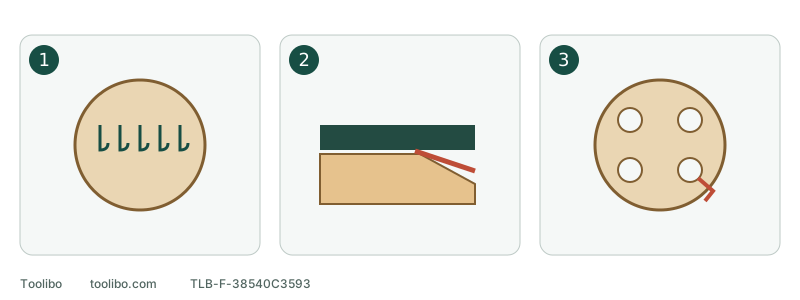
1. Fastening face
Inspect both the central and outer hook surface.
2. Separated support layers
A gap between support layers is not loose surface dust.
3. Extraction-hole damage
A torn hole edge needs attention even after a blockage is removed.
A sound fastening face does not rule out separated layers or damaged hole edges.
Separate the disc from the pad
The sanding disc carries the abrasive. The backing pad is the tool-mounted part that supports and attaches it. Its fastening face, support layers and dust openings perform different jobs. “The disc still sticks” is not a complete condition check.
Switch off, wait for a full stop and unplug or remove the battery. Remove the disc using the method allowed for its attachment system. For adhesive-backed paper, follow that model’s removal instructions rather than tearing stubborn paper away just to inspect the pad. This is an external inspection, not motor or bearing disassembly.
Inspect the fastening face
Examine the centre, then the perimeter. Loose dust can hide sound hooks; shiny flattened areas or missing hooks may represent damage that brushing cannot repair. Compare a doubtful patch with an apparently intact area without treating appearance alone as proof.
Use the tool’s permitted cleaning method. A small brush may be used lightly on the Milwaukee 2648-20 hook face. Do not attempt to restore missing hooks with a metal comb, blade or solvent. Combine the visual check with disconnected fitting of a correct disc rather than repeatedly cleaning damaged material.
Inspect shape and layers
Look from the side for lifted edges, notches, cracks and gaps between layers. Change the viewing angle by gently reorienting the disconnected tool; do not force the pad to flex or hammer it flat.
Swipe or scroll horizontally to see all columns.
| Observation | Why it differs from dirt | Next step |
|---|---|---|
| A piece missing from an edge | Material has been lost | Identify the compatible replacement |
| A gap between pad layers | The pad itself is separating | Stop; do not glue it together |
| A raised or distorted section | Support under the abrasive has changed | Keep out of use; replacement or service |
| Loose dust only | Shape and fastening face remain sound after cleaning | Continue with holes and fit checks |
Pads can have different designed edge shapes and firmness. Do not use another model’s appearance as a universal standard.
Inspect extraction openings
Check each visible opening for debris, torn edges and bulging. Removing a blockage does not repair a split hole edge. Do not enlarge openings with a drill or cut a mismatched disc to resemble the pad pattern.
Keep cleaning within the accessible, permitted area. A blockage requiring housing disassembly needs the appropriate maintenance or service route. A loose collector lid or wrong hose can also reduce extraction; do not assign every dust problem to the pad.
Identify a replacement before buying
Record the tool model and its Type or service identity, then the pad’s complete marking, diameter, attachment system and mounting interface. Similar shape and hole count do not establish the same screw pattern or compatibility. “Universal five-inch pad” is not a sufficient specification.
If there is no structural damage and cleaning is complete, fit a correct new disc with power disconnected. It should be centred, holes aligned and edges flat, without folds or unsupported sections. Failed attachment still needs correction before use. Wobble, unusual noise or vibration requires inspection even if the pad looks intact: an external check cannot rule out internal faults.
Models referenced