
Physical control and remembered protection
Two hooks seat in ring slots; five trigger actions accompany a fading indication, while a separate lamp shows flashing.
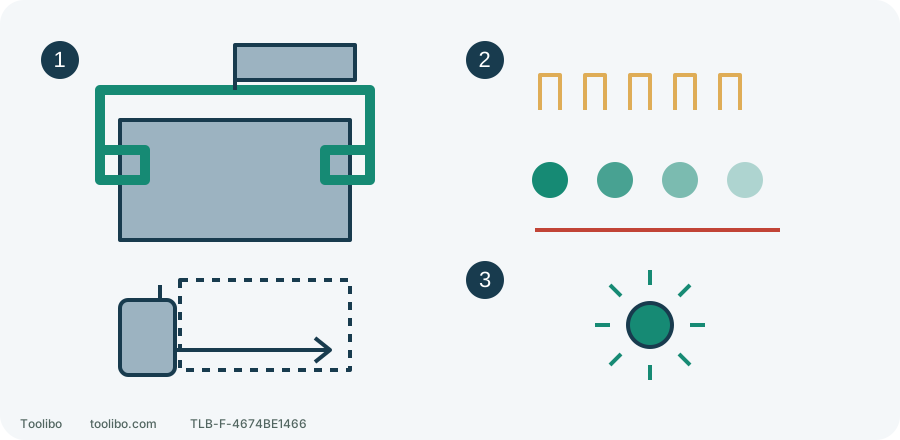
1. Hooks and hand space
Both hooks must seat; retain room for two hands and the side handle.
2. Fades out: disabled
Do not start; repeat the specified toggle and confirm the enabled signal.
3. Flashes: enabled
Battery changes preserve the last state; never test by deliberately jamming.
Conceptual mounting and indications, not exact geometry or blink timing. Five pulls in centre lock toggle the state; they do not always enable it.
Seat both side-handle hooks
This guide concerns the US 2904-20 and manual 58-14-9998d1. The same manual includes the 2903-20; that does not give the latter a hammer mode. If a battery smokes, leaks or becomes rapidly hotter, move away from the hazard rather than following an ordinary removal routine. The following assembly is for stable equipment that can be approached safely.
- Release the trigger, wait for all movement to stop and remove the battery. The centre trigger lock is not a substitute for isolation.
- Loosen the side-handle grip until its two hooks can fit into the slots on the gear-case ring. Hanging them on the outside edge is not correct engagement.
- Position the handle on top, pointing left or right. Check that both hooks enter their slots, then tighten the grip securely.
- With the battery still removed, check for handle movement and hooks lifting out. Cracks, deformation or a grip that will not tighten require suitable replacement parts or service, not tape or improvised packing.
Without touching the trigger, bring the drill to the planned hole axis and check room for both hands and the side handle. If it only fits after removing the handle, reposition the work or choose another suitable method. Electronics cannot compensate for inadequate physical control.
AUTOSTOP is not the screwdriving clutch
Numbered clutch settings control screwdriving output. The drill symbol selects rotary drilling; the hammer symbol selects percussion on the 2904-20. AUTOSTOP helps limit excessive tool rotation when a bit binds. It does not replace clutch selection, workholding or two-handed control.
AUTOSTOP is enabled when shipped, but retains the operator’s last choice across battery changes and changes in charge. A freshly charged battery therefore tells you nothing about a borrowed tool’s current mode. Nor does the absence of a previous shutdown establish that mode.
Interpret the five-pull indication
This is a dedicated setting procedure, not a way to troubleshoot a running or stalled drill. Complete safe assembly and normal pre-use checks first. Keep the accessory clear of the work and people and hold the tool securely. With your finger off the trigger, install a compatible M18 battery and confirm retention. Put the direction switch in its centre locked position. The motor must not run there; if it does, stop using the tool and arrange service.
The manual specifies five trigger pulls in the centre locked position to toggle AUTOSTOP. This does not mean that five pulls always switch it on regardless of the previous state:
Swipe or scroll horizontally to see all columns.
| AUTOSTOP lamp after five pulls | Meaning | Next action |
|---|---|---|
| Lights, then fades until off | Disabled | Do not start work; repeat the specified toggle once and confirm the enabled indication |
| Flashes | Enabled | Still complete the handle, accessory and workholding checks |
| Unclear or inconsistent indication | State unconfirmed | Do not guess; stop preparation and ask Milwaukee service |
Read the dedicated AUTOSTOP lamp, not the work light or battery gauge. This guide does not turn the manual’s tool-rotation test into casual advice to jerk the drill, and does not use a deliberately jammed or restrained rotating accessory as a test. A mode indication is not proof that every workplace hazard has been removed.
Prepare an actual scrap-work exercise
For a hole in firmly clamped scrap wood within both drill and bit capacities, remove the battery, fit a suitable bit with the jaws gripping the correct shank area, select the drill symbol and choose the gear for the material, diameter and accessory. Gear 1 is low and gear 2 high. Change gears only after a complete stop; neither is a universal setting for all wood holes.
Check backing and safe exit clearance so the bit cannot drill through the bench, and make sure the work cannot turn with it. With your finger away from the trigger, reinstall the battery and confirm that it is secure. Select the correct forward drilling direction, then hold both handles, place the tip at the intended point and start slowly, feeding along the bit axis. In particular, do not start a long bit spinning freely at high speed or exceed its speed rating.
For screws, use the correct driver bit and a numbered clutch setting instead. Trial the setting on equivalent scrap, starting low and adjusting gradually. Do not substitute drill mode for an unset clutch or hammer mode for ordinary screwdriving.
After an unexpected stop, address the cause
If the drill shuts down or twists noticeably, release the trigger immediately, maintain safe control and wait for a complete stop. When the tool and battery are stable and safe to approach, remove the battery before checking a trapped accessory, shifted work, a misaligned drilling axis or a loose handle.
Resume normal preparation only when the cause is identified and corrected, tool and accessory are undamaged, the work is secured again and hand clearance is restored. Repeated trigger pulses or disabling AUTOSTOP are not ways to overcome the original obstruction. Repeated shutdowns, unclear indicators, an insecure handle or a faulty switch mean stop using the drill and arrange inspection, not try several more times.
Models referenced