
Shared modes and the hammer-only difference
Two model panels show clutch and drilling on both models, with an extra hammer symbol only on 3404-20.
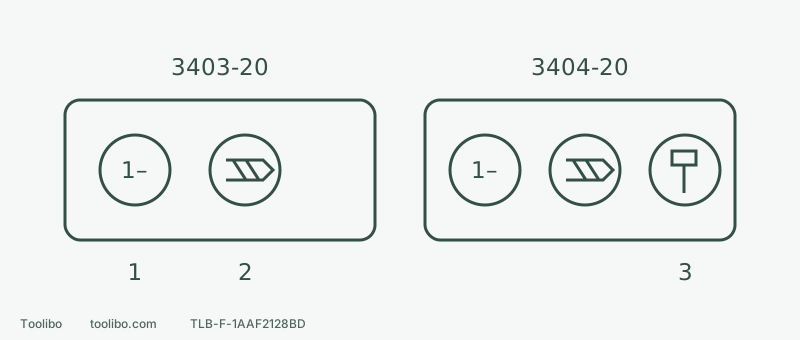
1 · Numbered clutch
For an appropriate fastening setting; numbers are not a universal torque scale.
2 · Drill symbol
Ordinary rotary drilling, separate from low clutch protection.
3 · Hammer symbol
3404-20 only; confirm approved masonry, bit and capacity before use.
Conceptual symbols, not exact collar positions or the complete number scale. Align the actual tool markings only while stopped and isolated as instructed.
Confirm which tool you have
This guide addresses US Milwaukee 3403-20 and 3404-20 using their shared 58-14-3400d2 instructions. Read the full physical model label, not colour, appearance or a box picture. Only 3404-20 is the hammer-drilling version.
When the manual says 3404-20 only, do not apply that passage to 3403-20. If physical markings disagree with the document, stop and check the edition. Twisting farther, pressing harder or fitting a masonry bit cannot reveal a function the tool does not have.
Read the three markings
Swipe or scroll horizontally to see all columns.
| Mark aligned with the pointer | 3403-20 | 3404-20 | Purpose and boundary |
|---|---|---|---|
| Numbered clutch setting | Yes | Yes | Choose for the screwdriving task; numbers are not a universal N·m scale |
| Drill symbol | Yes | Yes | Ordinary rotary drilling; do not assume a low-clutch protective setting remains active |
| Hammer symbol | No | Yes | Hammer drilling only with approved tool, bit and material; not ordinary wood/metal holes or furniture screws |
The manual’s approximate clutch torque guidance depends on a fully charged battery and notes that hard-joint values may be higher. Do not turn one number into a universal installation torque; specified fastening requirements need their prescribed control method.
Hammer drilling acts along the bit axis, unlike an impact driver’s rotational blows. Treating the hammer mark as a strong setting for every job can damage bits, work or fasteners.
Choose the mode in four steps
- Name the current operation: making a hole or driving a screw. One project can need different settings for its separate steps.
- Identify material, diameter, bit and tool capacity. Ordinary wood and metal holes use drilling. Masonry requires specifically approved hammer use and the actual 3404-20 model.
- Stop completely and remove the battery before checking markings and aligning the required symbol or clutch number as instructed. Change accessories with the battery removed too; never tighten by holding the chuck under trigger power.
- Check gear, direction, accessory holding, work clamping and protection, keep fingers off the trigger, then insert an explicitly compatible battery and confirm it latches. Begin controlled ordinary work as instructed; stop and isolate again before adjustments.
Walls additionally require concealed-service and fixing checks. A hammer symbol cannot supply them. This manual also prohibits attempting to drill reinforcing steel with the relevant carbide bits; stop at an unexplained obstruction rather than forcing through.
Check speed separately
The top 1/2 selector chooses mechanical speed range. Trigger pressure controls speed within that selection. Neither is an extension of the numbered clutch collar. Record mode, gear and trigger control separately rather than saying only set it to 2.
These instructions require a complete stop before changing gears or direction. Do not push a selector while rotating or disguise an incorrect gear/accessory with more trigger pressure. Material, accessory and tool instructions determine the speed and feed; no single setting covers every wood and metal task.
Three misleading situations
Swipe or scroll horizontally to see all columns.
| Observation | Check first | Do not do this |
|---|---|---|
| Clutch slips before the screw seats | Fastening instructions, bit fit, pilot hole and clutch setting | Immediately select drilling and force it home |
| Poor wood hole with pounding | Accidental hammer mode, bit suitability and holding | Treat pounding as proof of extra useful power |
| No hammer mark on 3403-20 | Confirm the non-hammer model label | Force the collar into a nonexistent position |
Stop for slipping, obvious wobble, abnormal heat or repeated shutdowns. A mode selector chooses the action; it is not a fault-repair switch.
Verify model, task, mode and speed separately. With another model, keep that checking sequence but use its own markings and instructions.
Models referenced