
Three damage patterns, three first checks
The sketches separate an edge tear, a pre-existing fold and backing separation; none diagnoses an internal fault.
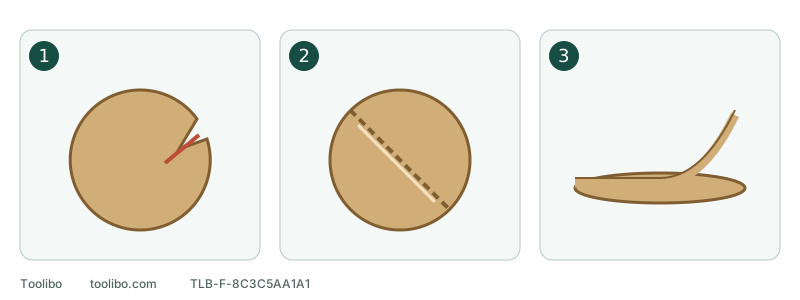
1. Torn outer edge
Check nearby clamps, projections and the original route.
2. Fold before fitting
Inspect unused discs; do not fit an already damaged sheet.
3. Separated layers
Check consumable integrity, attachment and pad support.
The sketches separate an edge tear, a pre-existing fold and backing separation; none diagnoses an internal fault.
Remove the damaged disc, not just its torn edge
First assess smoke, severe overheating or imminent danger: move away and respond safely rather than approaching just to remove paper. Only when the equipment is stable and safely accessible should you switch off, wait for all motion to stop and remove a normal battery or isolate the appropriate supply. Never pull a loose edge while running or keep using a disc with a starting tear.
While safely isolated, photograph the fitted disc to preserve its position relative to the pad. Once removed, lay it flat and photograph its back and tear. Record whether you were in the board centre, near an edge, beside a clamp or in a narrow corner. Photos guide inspection; a tear alone cannot diagnose bearings or the pad mechanism.
Three recognizable patterns and their first checks
Swipe or scroll horizontally to see all columns.
| Example you see | Check first | What it does not establish |
|---|---|---|
| An initially intact disc tears from an outer notch near a clamp or projection | Projections, clamp position, approach/exit route and pad support | An edge notch alone does not prove eccentricity or bearing failure |
| An unused disc already has a fold, paper crack or packaging crush damage | Handling, storage and pre-installation condition of the batch | It is not evidence of damage caused by running; do not fit it to test |
| Face and backing separate, the rear partly detaches or an edge lifts after fitting | Abrasive integrity, attachment, pad surface and approved intermediate layers | It does not by itself identify adhesive failure, pad damage or a defective brand |
One disc may show several patterns. Start with a known event such as “it tore beside the left clamp,” rather than treating every later crease as the original cause. If the starting point was not seen, say so; do not deliberately tear another disc to fill the gap.
Inspect the original route with power isolated
Look for protruding nails, screws, hard lumps and edge obstructions. Milwaukee 2648-20 specifically warns that contact with fasteners can cause loss of control, not merely damaged paper. Deal with obstacles by a safe method appropriate to the work; do not let the disc grind them away incidentally.
Preserve or mark the clamp position and rehearse approaches, turns and exits statically. Relocate workholding if the pad would hit it. If a narrow strip or inside corner cannot support the pad securely, change tool or method rather than reaching with a tilted abrasive edge. After repositioning clamps, confirm the work is still secure; access is not a reason to loosen effective restraint.
Check three interfaces before fitting the next disc
First, confirm diameter and extraction-hole pattern for the exact model; do not cut an oversized disc to approximate fit. Second, match attachment: hook-and-loop backing needs its specified pad, and PSA needs an approved pad rather than mixed layers or added glue. Third, inspect support: edge, foam and fastening layer must be intact, and any protector or interface pad must belong to an approved arrangement.
A cracked, missing, delaminated or visibly distorted pad requires stopping and an appropriate replacement or service plan. New paper cannot repair it. Inspect an unused disc before installation for flatness, intact backing and absence of folds or tears; do not fit a questionable one. Install flat and aligned as instructed rather than expecting running pressure to flatten a lifted edge.
After an identified correction, check without repeating the damage
Restore operation only after correcting an ordinary external cause, with no wobble, abnormal vibration, unusual noise or unresolved tool problem. While isolated, prepare the new disc, secure support and extraction for a known suitable material. Confirm OFF before restoring power, then follow the exact model’s sequence for a short, controlled check on secured scrap, not a valuable finished surface.
Keep the pad flat, use light pressure and maintain controlled movement. Do not press the disc edge at a board boundary or dwell in one place. Poor cutting calls for stopping and checking, not extra pressure. Afterwards switch off, wait for a complete stop and isolate power again before checking the edge, backing and seating for new damage.
If it tears again, lasting slightly longer does not mean the cause is fixed. Stop rather than consuming a third or fourth disc. An external cause that remains unidentified also calls for support, not repeated abrasive replacement as a diagnostic procedure.
Keep a short record that reconstructs the situation
Note body model, pad and intermediate-layer identity, abrasive product and grit, starting location of damage and the obstacle or boundary nearby. Include safely isolated photographs, whether damage existed before fitting and any recent pad replacement.
Wobble, changed vibration, unusual noise or repeated tearing means keep the tool out of use pending correct accessory or service advice. This guide does not diagnose bearings from tear shape or prescribe unknown-fastener torque. The acceptable outcome is an identified correction with the proper configuration and intact abrasive, or a tool awaiting assessment, not concealed damage.
Models referenced