
Read the parts-file identity fields
Each card shows Model, Body Number, Version and Issue Date in that order. These are document fields, not a copied tool label or repair steps.
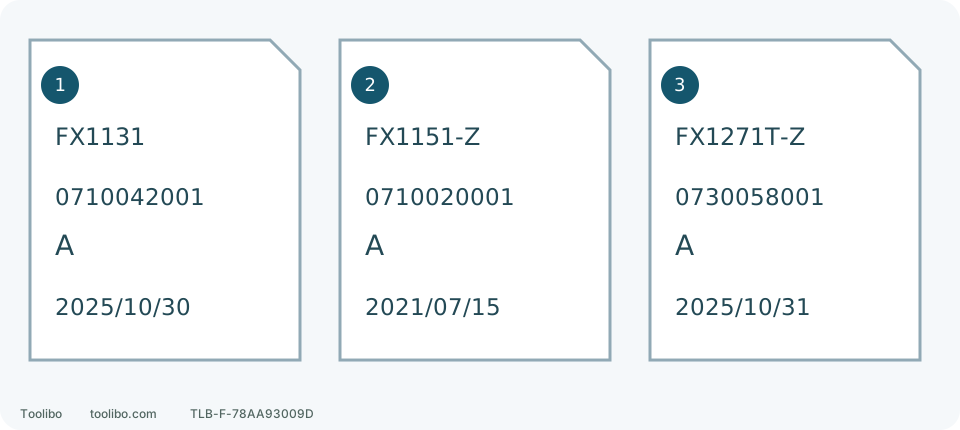
1 · FX1131
0710042001 · A · 2025/10/30
2 · FX1151-Z
0710020001 · A · 2021/07/15
3 · FX1271T-Z
0730058001 · A · 2025/10/31
Each card shows Model, Body Number, Version and Issue Date in that order. These are document fields, not a copied tool label or repair steps.
Record the tool, not just the kit name
A listing may say FX1151-2A while the tool itself is FX1151. The first identifies the package; the second starts the manual search. Only when equipment is stable and safely approachable, remove the battery and read external labels. Do not open the housing to find an identifier. If a pack is smoking, leaking or persistently abnormally hot, do not approach, touch or remove it merely to read a label; keep away and seek help under local emergency guidance.
FLEX 24V model identification is generally on the side, with the serial number underneath. Photograph the external label and record model, serial and full order SKU separately. Share the serial privately with the service provider that needs it, not in a public comment. A clear photograph is better than guessing from color when a label is worn.
Read the correct model column in a shared manual
Swipe or scroll horizontally to see all columns.
| Tool | Models on its manual cover | Common confusion |
|---|---|---|
| FX1131 | FX1231 / FX1131 | FX1231 hammer action does not belong to FX1131 |
| FX1151 | FX1151 / FX1251 | FX1251 hammer rates do not belong to FX1151 |
| FX1271T | FX1171T / FX1271T | Ordinary and hammer drill actions differ |
The operator manual explains assembly, controls, accessories and precautions. A parts sheet connects illustration positions to part numbers and service versions. An exploded illustration is not an instruction sequence for opening a motor or gearbox.
Complete a lookup on the manufacturer’s site
- Open Manuals & Parts on the FLEX site for the purchase region. Search the tool model, such as FX1151, rather than a retailer’s kit nickname.
- Confirm the full result. If -2A and -Z both appear, inspect their operating and parts files rather than assuming identical internal revisions from the suffix.
- Open the operating manual and confirm FX1151 on the cover. Enter a language you understand; printed English page 9 identifies its specifications and controls.
- Open the parts file and examine the identity block at the upper right of page one before matching position and part numbers. Establish applicability before ordering.
- Save the file and the revision fields actually printed inside. Your download date is neither a manufacturing date nor a document revision.
None of this requires opening the machine. If the file is incomplete or the drawing does not match the equipment, ask FLEX to identify the correct document. Do not reconstruct missing assembly steps from a search excerpt.
Fields in the current parts files
These are the inspected US files, not a promise that every old or current unit uses the same parts.
Swipe or scroll horizontally to see all columns.
| Tool | Model Number | Body Number | Version | Issue Date |
|---|---|---|---|---|
| FX1131 | FX1131 | 0710042001 | A | 2025/10/30 |
| FX1151 | FX1151-Z | 0710020001 | A | 2021/07/15 |
| FX1271T | FX1271T-Z | 0730058001 | A | 2025/10/31 |
A useful completed record is: tool FX1151; order FX1151-2A; manual cover FX1151/FX1251; parts file FX1151-Z, Body 0710020001, Version A, Issue Date 2021/07/15; serial supplied privately. This is much more precise than asking for a chuck for a 24V drill.
A download address can later serve a revised file, while search results still show an older date. Use the fields in the actual document and ask service to confirm applicability to your serial. A shared Version A does not make parts interchangeable across models.
Describe the symptom before guessing a failed part
State whether the problem occurs during driving, drilling or no-load running, which gear, accessory and material are involved, and whether there is abnormal noise, burning smell, visible wobble or unusual heat. Add external photographs taken safely, but do not repeatedly run damaged equipment to record a demonstration.
Ask: “Does this Model/Body/Version/Issue Date file apply to my model and serial, and how should this symptom be inspected? ” Internal transmission, electrical and protective-system work belongs with suitable service personnel. Correct identification should support a repair decision, not turn a similar-looking diagram into a universal dismantling guide.
Models referenced