
Action, range and Turbo are separate choices
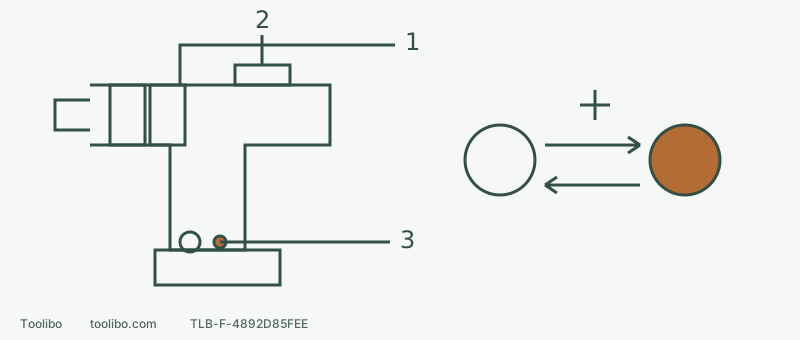
Two rings, a top range switch and foot button with indicator are marked; unlit and lit indicators are linked by stopped-tool button changes.
1 · Choose the task action
Driving, rotary drilling and permitted percussion are not selected by the Turbo button.
2 · Set mechanical range
Fully engage the appropriate range after stopping; retain the required side handle and two-hand room.
3 · Confirm the Turbo indicator
Press while stopped: indicator on enables Turbo; release and stop before pressing again to return to normal.
Conceptual control map, not a side-handle installation drawing. Ring or accessory work needs battery removal; Turbo switching needs a stopped, correctly prepared tool.
Match each control to its job
The top slider chooses mechanical range 1 or 2. Behind the chuck are the torque-adjustment and function-selection rings for driving, rotary drilling and hammer work. The Turbo button and indicator sit on the foot near the battery, separate from the worklight itself.
FX1271T’s normal no-load ranges are 0–550/0–2,000 rpm; Turbo gives 0–700/0–2,500 rpm. It changes speed, not a low clutch setting into higher torque. The manual says torque remains unchanged and the battery depletes faster. These figures are not a measured hole-completion time.
Fit the accessory and side handle with power disconnected
If the battery is smoking, swollen, leaking or unusually hot, do not approach or handle it to prepare the drill; stop and contact the manufacturer. Without those signs, release the trigger, wait for a complete stop, centre-lock the direction and remove the battery before installing a suitable accessory.
Do not omit the auxiliary handle because space is tight. Following this model’s illustration, loosen its grip, align the raised mounting portion with the grooves on the gearbox, fit it correctly and tighten securely by hand. Check it before every use. This is not another model’s hook mounting. If you cannot verify engagement, tightening or room for both hands, pause.
Keep the bit centred and grip its suitable shank while hand-tightening; never hold the chuck and pull the trigger. Set function and mechanical range while disconnected too, with the selector fully engaged.
Choose the action independently of Turbo
Swipe or scroll horizontally to see all columns.
| Actual task | Function choice | Mistake to avoid |
|---|---|---|
| Ordinary screw trial | Driving function and low numbered clutch on matching scrap | Do not bypass the clutch with drilling mode |
| Suitable wood, metal, ceramic or plastic drilling | Rotary drilling with a matched accessory | Difficulty does not justify switching to hammer |
| Assessed, suitable masonry work | Hammer only after checking percussion-rated bit, capacity and dust controls | Hammer is not a way to investigate an unknown wall |
Drilling and hammer modes lock the clutch. A low number is no universal reaction-torque limiter, and binding can still twist the tool. Keep the auxiliary handle and stable posture. Mechanical range 1 favours torque at lower speed; range 2 favours speed at lower torque. Choose only within task and accessory limits.
Activate and deactivate Turbo deliberately
Once preparation is complete, the work is secured and the area cleared, install and latch the specified battery with your finger off the trigger. While the tool remains stopped, press the Turbo button and confirm its indicator lights. Then release the centre direction lock, select the appropriate rotation, hold both handles as required and place the accessory in the correct starting position before pressing the trigger.
To turn Turbo off, release the trigger and wait for a complete stop, then press the button. Its indicator should go out and normal mode resumes. Do not switch while running, or mistake the worklight for the Turbo indicator. Unexpected button or indicator behaviour calls for checking, not repeated loaded trials.
For an accessory, ring, gear or handle adjustment, stop, centre-lock and remove the battery again. Afterwards repeat the finger-off-trigger battery installation, latch check, Turbo-status check, direction selection and proper grip.
Use a short starting checklist
Confirm the material and diameter are permitted; the accessory is suitable and secure; the handle and two-hand clearance are sound; function matches task; the gear is fully engaged; Turbo indication matches the plan; and workholding and dust controls are ready.
Make the first attempt in an already assessed, observable and controllable position. If normal mode suits the job, there is no obligation to use Turbo. Stop for stalling, abnormal twisting, slipping, overheating or failed dust control. Turbo is not a fault-reset button, and deliberately binding the bit is not a protection test.
Models referenced