
Clamp rear-first, or align PSA at the front
Left: paper wraps beneath the cushion between rear and front levers. Right: PSA aligns at the front with possible rear excess and a peeled release liner.
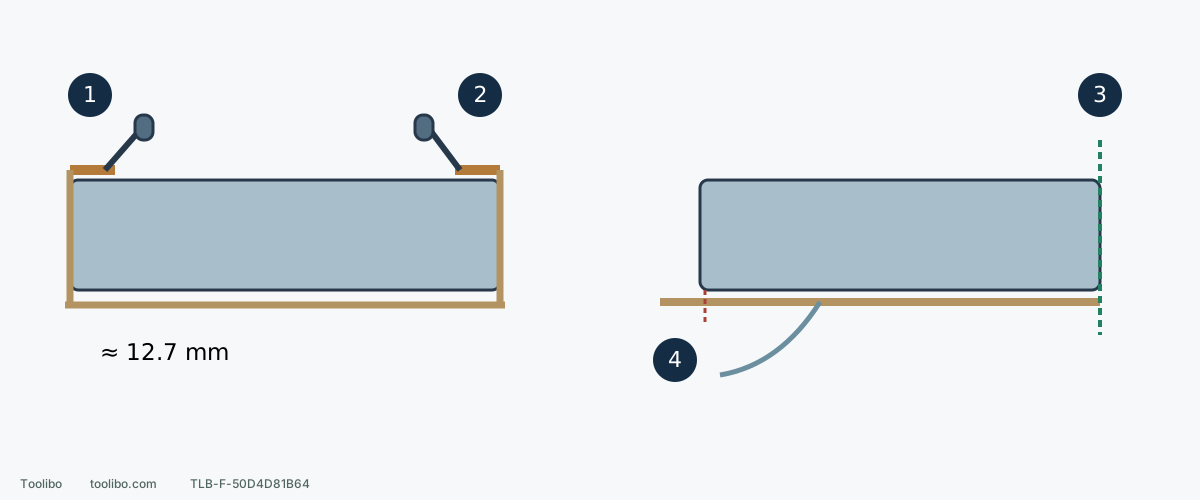
1. Rear clamp
Insert about 1/2 inch, then lock the rear lever behind its retaining tab.
2. Front clamp
Wrap beneath the cushion, tension the loose end and lock the front lever.
3. PSA front alignment
Match the paper front to the cushion front before pressing the full adhesive face.
4. Rear excess and release liner
Peel the release liner; trim rear excess only if needed, with battery removed, without moving the aligned front backward.
Side views are simplified. The 12.7 mm figure is approximate rear insertion; the rear cut line is optional trimming, not a universal dimension.
Choose the paper route first
PCL401’s cushion accepts non-adhesive quarter sheets held by front and rear clamps, or PSA quarter sheets bonded to the cushion. It is not a hook-and-loop pad. Confirm PCL401-compatible size, attachment and hole arrangement; choose grit separately for the material and finish.
Switch off, wait for a complete stop and remove the battery. Check sound paper, an intact undistorted cushion and clean clamp/contact surfaces. Choose one route; do not stick a fresh PSA sheet over the old one.
Route one: ordinary paper starts at the rear
- To remove existing paper, lift front and rear levers clear of their retaining tabs, open the clamps and remove the sheet.
- Insert the new quarter-sheet end about 1/2 inch, approximately 12.7 mm, beneath the rear clamp with a square edge. This is not another model’s front-first 1/4-inch rule.
- Lift the rear lever and lock it behind its tab, then press paper down to conform to the platen.
- Wrap around the cushion, lift the front lever, insert the free end and tension the paper flat.
- Lock the front lever behind its tab and check both ends hold with no wrinkles or slack.
If the front will not reach, check size and rear insertion rather than pulling until it tears. If a lever will not retain, inspect overlapping paper, debris or damage; do not bend it into place.
Route two: remove the old adhesive sheet
With the battery out, peel old PSA from the cushion. If changing from ordinary paper, release its clamps, remove it and relock the levers in their normal positions. Clear loose dust and paper remnants so the new adhesive has continuous contact. Do not gouge the cushion with metal or apply unverified adhesive solvents.
Do not tear the cushion to defeat firmly set adhesive. The manual offers a few minutes of ordinary sanding to soften old glue, but only consider that when the old paper is sound and securely attached and the work/material conditions are safe. Confirm OFF before refitting the battery; start clear of the work, reach speed before contact, and lift clear before switching off. Wait until all movement has stopped, then remove the battery again before peeling. Never peel while running or substitute a heat gun or flame. Damaged or loose paper and unknown stock rule out this warming trial; resolve the consumable or obtain appropriate service help.
Align new PSA at the front
Peel the release backing carefully, keeping adhesive clean. Align paper and cushion front edges before pressing the full adhesive face progressively, avoiding skew, wrinkles and bubbles. Front alignment enables this model’s flush work; equal overhang on all sides is not the target.
The cushion is approximately 1/4 inch smaller than precut adhesive sheets, so surplus may project at the rear. Trim that rear overhang if needed, with the battery still removed and without damaging the cushion. Do not cut the same amount from every side or shift the front edge backward to hide rear excess.
Punch and inspect either route
Install paper first, orient the cushion over the supplied punch and press down to produce matching extraction holes. Check that paper remains flat, holes correspond and clamps or adhesive have not shifted during punching. Make holes in paper, not by drilling the pad.
After checking collection, secured work and travel, confirm OFF before fitting a compatible battery and verify both side latches retain it. If a trial reveals flapping, lifting or new deep lines, finish in this model’s order, wait and remove the battery before inspection. Never press a moving paper edge by hand.
Remove PSA before storing
Adhesive can continue forming a tighter bond after sanding. Once work ends and the tool is safely stopped with the battery removed, take PSA off promptly before storage. Delay can make it difficult to peel, leave torn remnants and obstruct the next sheet. Ordinary and adhesive paper remove differently, but both require stopped, isolated handling and an intact cushion before the next sheet goes on.
Models referenced