
Gear selection is not trigger control
Separate diagrams show the top gear slider, side trigger and stop symbol.
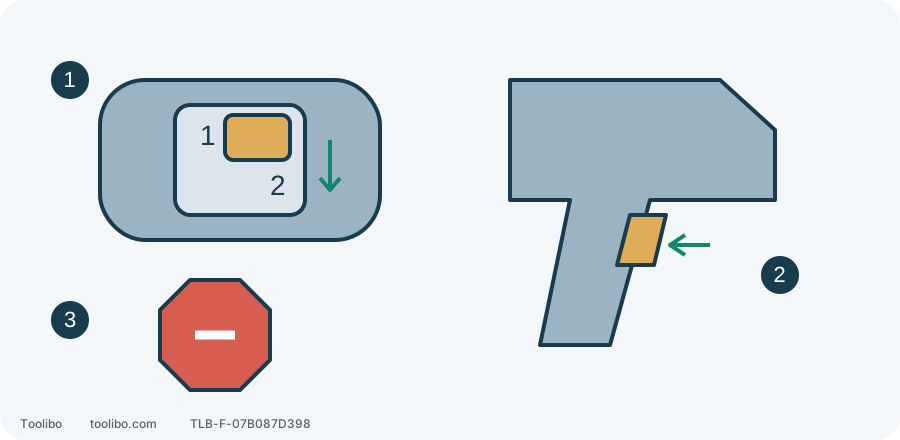
1. Mechanical range
Select 1 or 2 fully before starting.
2. Trigger travel
Vary speed within the selected range.
3. Stop to shift
Wait for complete rotation stop before moving the gear selector.
Control-location schematic, not an internal gear drawing or a speed scale.
Give each control one job
The mechanical selector chooses the transmission range. The trigger controls speed within that range. On Milwaukee 3403/3404 drills, the top selector displays 1 for low and 2 for high. Barely squeezing the trigger in gear 2 does not turn it into gear 1: the transmission remains in the high range.
A demanding low-speed task calls for the appropriate gear, not prolonged high-gear feathering against resistance. The direction switch handles forward, reverse and centre lock. The clutch ring sets screwdriving release. Neither replaces the gear selector.
Choose from the task
First check that the material, bit and hole size fall within tool and accessory limits. A large accessory can produce substantial reaction torque; selecting low gear does not make every hole saw suitable.
- Consider gear 1 for screwdriving and work needing lower speed with greater driving force, then set the screwdriving clutch for the fastener and material.
- Consider gear 2 for appropriate faster drilling, subject to the accessory’s material and speed instructions. A small bit is not an automatic instruction to use full speed.
- Hard material, larger holes or an accessory prone to grabbing require another check of speed, capacity and holding arrangements. Extra body pressure cannot correct a poor setup.
No gear suits every hole. Use securely clamped matching scrap for a trial and judge stable cutting, not how loud the motor sounds.
Stop fully and engage the selector
Release the trigger and wait until chuck and bit stop completely. Move the top selector so the required number is displayed: 1 for low, 2 for high. Do not leave it between positions or shift during rotation.
If it will not seat normally, do not strike it, force it or power an accessory against the work to make it engage. Stop preparation and check that rotation has ceased and no external debris obstructs the control. A selector that cannot select or retain a position needs attention before any trial drilling.
Remove the battery when changing or adjusting accessories. A selected gear is not an accidental-start lock.
Put the sequence into a wood-screw task
For an ordinary screw in secured timber, choose a correctly fitting driver bit and prepare a pilot hole where the timber and fastener require one. This example is not a design for a load-bearing connection.
- Fit the bit with power disconnected. With the tool stopped, select gear 1 and a low screwdriving clutch setting.
- Check the forward setting, align the bit with the screw and clamp the work. Keep your hand out of the slip path. Once setup is checked, keep your finger off the trigger and refit a compatible battery using the tool’s installation procedure; confirm it locks securely.
- Squeeze gently for a controlled start, increasing trigger pressure only as needed. Do not begin at full trigger.
- Ease off as the head approaches the surface. Release and stop before adjusting the clutch.
- Release immediately if the bit binds, the housing twists or speed drops sharply. Investigate the pilot hole, bit, fastener or load; high gear is not a jam-release method.
After completion, release the trigger and wait for the accessory to stop before setting the drill down. The gear chooses the range beforehand; the trigger manages starting, speed and stopping during the work.