
Find the two different controls
The front dust-protected switch is A in the component drawing: I starts and O stops. The side wheel B selects working speed. The bag collar is not a speed control, and minimum speed is not OFF. DWE6420 and DWE6421 share parts of the booklet, but this variable-speed guidance concerns DWE6423.
Press O, wait for the pad to stop and unplug before adjusting. Roll side wheel B to bring the chosen setting into view: select a higher setting to increase speed or a lower one to decrease it. Do not transfer a clockwise instruction seen from another viewing angle or force the wheel beyond its end. Resolve damaged markings, binding or a setting that will not hold before use.
Finishing does not mean maximum speed
Remove loose surface dust and inspect under changing light. If the previous coarse scratches remain, finer paper plus more speed is usually not the useful next step. Decide whether the current grit has finished its removal task before changing abrasive. Establish a short new baseline when grit changes rather than making large simultaneous changes to paper and speed.
The range is 8,000–12,000 orbits per minute, not actual pad RPM or a direct measure of stock removal. There is no individually calibrated intermediate-setting table here. A higher number does not automatically produce a finer surface.
Start from material and removal allowance
Higher settings generally suit harder material and lower settings softer material. This guides selection; it does not require maximum for hardwood or minimum for softwood. Consider abrasive product, defects, remaining thickness and intended finish. Thin veneer or an edge near its final dimension may need no further removal rather than a different speed.
Use matching material with similar surface condition and enough allowance. Assess unknown old coatings first. DWE6423 excludes drywall sanding and drywall screen directly on its hook-and-loop pad. A low setting does not change those limits.
Compare one change on two similar areas
- Secure the sample. Use one abrasive product and grit, and check holes, collection and cable route. Do not compare an already smooth area with an untouched rough one.
- Choose the first setting while unplugged, confirm O and reconnect. Follow the model’s normal grip and operation, keeping the pad flat and moving in long even strokes.
- After a small area, press O, wait and unplug. Inspect removal, scratch pattern and paper condition.
- If a speed comparison is useful, change only the wheel while keeping abrasive and pressure comparable. Confirm O, reconnect and repeat on the similar second area.
- Stop and isolate after every trial before comparing. Motor sound alone does not determine the better result.
Keep the combination that serves the task
Look for gradual reduction of the intended defect, reasonably even scratches, control and no new damage. If a higher setting improves removal while preserving those qualities, record it. Extra heat, smearing, rounded edges or reduced control is not improvement merely because work proceeds faster.
Loaded, dull or contaminated abrasive calls for attention to the paper and external pad condition. More pressure can reduce removal and damage the surface. Stop for sudden vibration, lifting paper or a new deep groove, then wait and unplug before inspecting. Do not continue with an unexplained cause.
Leave a useful record
Record wood and surface condition, abrasive product and grit, actual wheel mark, travel and observations. The last sanding stage must suit the chosen finish, not a goal of maximum speed or the finest possible paper. Recheck when wood, pad or finish changes: the same tool may need different settings for different tasks.
Separate the controls, compare similar trial areas
A front I/O switch and side ribbed wheel are shown beside two comparable sanding areas.
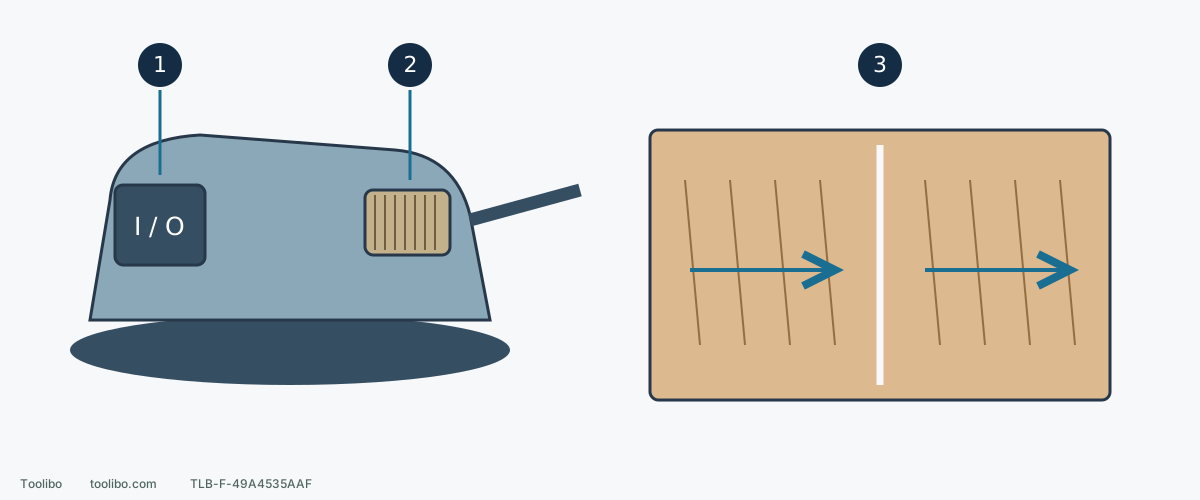
1. Front switch A
I starts and O stops; wait for motion to cease and unplug before adjustment.
2. Side wheel B
Select the working setting with the tool unplugged; minimum speed is not electrical isolation.
3. Compare one change
Use similar surfaces, the same abrasive and comparable pressure; change speed alone and inspect after stopping.
Control locations are simplified, not a measured product drawing. The dividing line marks separate trial areas, not a cut.
Models referenced