
Slow cutting does not automatically mean insufficient force
More pressure is not necessarily faster. DCW210 and DWE6423 instructions say excessive downward pressure slows removal and worsens the finish; SR211601 also warns about handling, vibration and marks from excess force. These are round-pad machines, not a technique to transfer to pointed or belt sanders.
If progress suddenly falls, finish sanding and switch off in the model’s sequence, wait for complete stop and unplug or remove the battery. Inspect for loading, dullness, damage, aligned holes and obvious collection blockage. Extra force does not restore failed paper. A damaged pad or unusual vibration is not an instruction to increase speed.
Make grip and travel repeatable
Secure the work and support the whole flat pad. Use the machine’s specified grips. Do not lean on one edge to chase a scratch or raise the nose to make a small grinding head. Pressure is for stable control and normal cutting, not a universal force in kilograms.
Move in steady overlapping paths, covering the previous path’s margin without leaving strips. Control the return too. Do not dwell at turns or give edges many extra passes and judge the whole board by its center. If a clamp obstructs travel, shut down, wait for complete stop, isolate and reposition before checking again.
An overhanging pad or a hose pulling sideways changes the test geometry. Fix support and routing before discussing speed. Let the abrasive cut rather than forcing the tool into a stall.
Set up two sample areas
Assess unknown old coatings or suspected hazardous dust first; do not prepare a powered trial when material or dust controls remain unclear. Use matching scrap in the same material and surface condition, with similar A and B areas marked outside the sanding zones. Bare wood, old paint and a finish film are not equivalent samples. Use compatible paper of the same product and grit, in comparable wear condition, with the same collection, posture and coverage pattern.
A confirmed applicable start/stop sequence is a prerequisite. SR211601’s printed-page-13 stop wording remains unresolved; a test record cannot bypass it. Until clarified, perform isolated checks only. Do not borrow another model’s contact/lift sequence for DWE6423 or DCW210 either. If your applicable instructions remain unclear, obtain clarification before any powered trial.
Record one change, not several at once
This is a record format, not a tested result or a recommended dial setting for a particular material.
- Area A baseline: note material and surface condition, paper product/type/grit, wear, collection and dial position. First use the shared switch-off and power-restoration preparation below, then the confirmed machine sequence, and maintain flat, steady coverage.
- Stop to inspect: complete the model’s shutdown, wait for all motion and isolate. Inspect scratches under side light, missed strips, paper loading and abnormal surface changes. Never feel moving paper or the work during this inspection.
- Change one item for B: if paper is loaded or damaged, replace it with a compatible new sheet/disc while keeping speed unchanged. If paper is sound but the result still needs improvement, make a separate comparison changing only the dial. Do not replace paper and raise speed in the same test.
- Write observations: “more even scratches/still missed strips,” “cleaner paper/rapid loading,” and “normal surface/abnormal change.” Do not estimate unmeasured removal weight, temperature or efficiency numbers.
Adjust only with power isolated. Before restoring power, confirm switch-off, securely refit a compatible battery or reconnect the plug, then follow the confirmed sequence. This comparison is not made by turning the dial with one hand while barely controlling a running machine with the other.
What speed numbers do and do not tell you
The DEWALT range is 8,000–12,000 OPM; SKIL is 7,000–13,000 OPM. OPM counts orbits per minute, not removal rate. Visible disc rotation is not a measuring instrument. Higher does not automatically mean faster cutting or a finer, flatter finish.
DEWALT’s generally higher speed for harder material and lower for softer material is a starting principle, not a recipe for every coating, plastic or timber. SKIL’s 1–6 positions are not individually calibrated here; do not calculate exact intermediate OPM from the marks. Judge actual scratches and material condition rather than the largest number.
When to stop rather than adjust again
Missed strips in both areas point first to coverage. If fresh paper restores normal cutting, record abrasive life and cleaning needs instead of automatically increasing speed. Abnormal heat, smell, vibration, loss of control or switch failure requires safe shutdown and isolation; do not retest with the cause unresolved. Do not open the speed controller, brake or drive to prove a guess.
Assess unknown coatings and suspected hazardous dust first. Only allowed dry sanding is covered; both DEWALT models exclude drywall. An attractive sample proves neither that the entire work cannot be sanded through nor that dust exposure is safe. Transfer repeatable conditions to the work, not an unverified “best setting.”
Same path, one changed factor
Two sample boards have matching travel paths; a separate panel distinguishes replacing paper at unchanged speed from a later dial-only comparison.
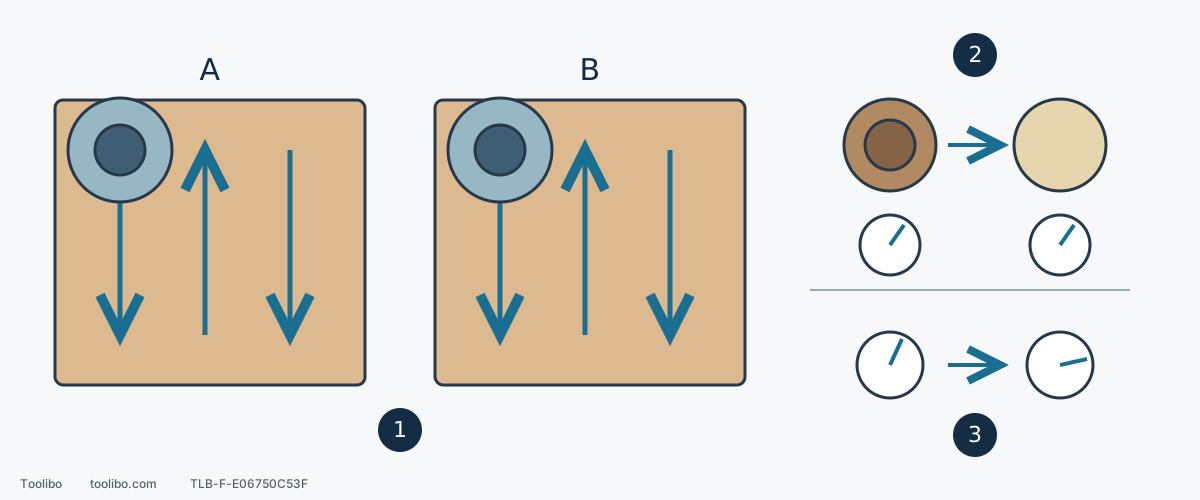
1. Hold the sample conditions constant
Match material, surface condition, paper product/grit, support, extraction and steady overlapping travel. An applicable confirmed operating sequence is required before power.
2. Bad paper: replace it without changing speed
A loaded or damaged abrasive is tested with a compatible fresh replacement at the same setting, after isolation; this separates paper condition from speed.
3. Sound paper: compare a dial change separately
Only if safe conditions and confirmed instructions allow, compare another setting without also changing paper or pressure. Stop for abnormal heat, vibration or loss of control.
Conceptual plan view, not a prescribed overlap percentage or dial angle. A/B are sample labels, not measured results. All changes and inspections require shutdown, complete stop and isolation.
Models referenced