
Choose the right disc first
The standard DCW210 and DWE6423 pads take nominal 5-inch, eight-hole, hook-and-loop discs. Check all three details on the pack. DCW210 prints 127 mm and DWE6423 prints 125 mm; buy for the exact model rather than treating those labels as a universal size tolerance.
The DWE6420 row in the shared manual specifies pressure-sensitive adhesive paper. That is a different model. A fabric loop backing and an adhesive layer are not interchangeable attachment systems.
Remove and fit the paper
- Switch off and let the pad stop. Unplug a corded machine or remove the DCW210 battery. Support the tool securely with the pad accessible.
- Peel off the old disc from its edge. Inspect for packed dust, loose particles and backing remnants. Use the cleaning method allowed for the tool; do not cut the hooks or pour solvent onto the pad.
- Hold the new disc just clear of the pad. Match the outside shape, then rotate it until all eight holes line up with the openings beneath. One aligned hole is not enough.
- Lower it without shifting and press evenly across the face. If it moves, peel it back and reposition it instead of stretching an attached edge.
- Look around the whole circumference for overhang, wrinkles, bubbles or lifting. Check every dust opening again.
In the eight-hole diagram, the two layers of openings coincide in the correct example. A centered outside edge with offset holes still needs refitting. This is not a universal template for every multi-hole abrasive.
Troubleshoot the fit
- The outline fits but the holes do not: check the hole pattern. More rotation cannot correct a different layout. Do not drill new holes in the pad.
- One edge repeatedly lifts: inspect the paper for a crease or debris and inspect the pad hooks. If a sound replacement disc also fails to attach, resolve the pad fault rather than adding tape.
- Dust increases after a change: stop and disconnect, then check alignment, collector, port and connector. Open holes are only one part of a suitable extraction system.
Check before the full job
Secure the work, connect the appropriate collector and use the model’s starting and stopping sequence on a safe representative sample. Watch for disc movement, lifting, unusual vibration or dust escaping a previously secure joint. Stop, wait for all movement to cease and disconnect before inspecting; keep hands away from a moving pad.
These DEWALT instructions exclude drywall applications and warn against drywall screen directly on the hook pad. An open mesh does not override tool or abrasive restrictions. Assess unknown coatings before sanding rather than using a trial pass to identify them.
Other machines need their own fit check
Use the same size–backing–hole sequence, but not automatically the same eight-hole specification. SKIL SR211601 has conflicting metric dimensions in its documents, and SR250801 has a shaped pad. Choose an abrasive explicitly listed for the exact model when a generic size description is ambiguous. Do not trim oversize paper while it is on the machine or alter the pad to suit it.
Eight holes: aligned and offset
Two circular pad views. In view 1 all eight white-rimmed paper holes coincide with blue pad openings; in view 2 the paper is rotated and the openings are blocked.
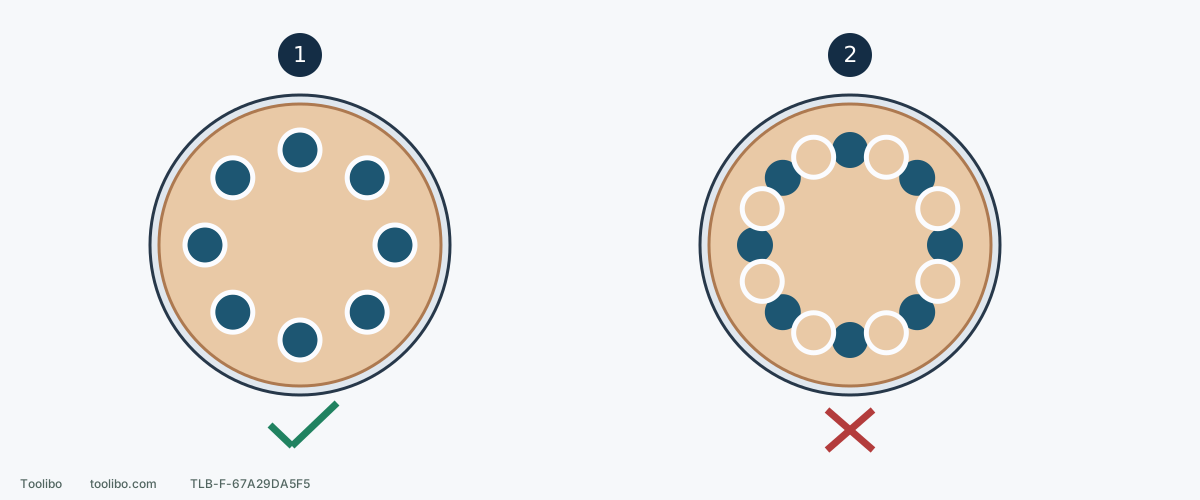
1. All openings coincide
The white rims show paper holes and the blue circles show pad openings. Center the outside edge and align every opening before pressing flat.
2. Centered outside, wrong inside
The paper edge can look centered while the holes are offset. Peel back and realign; do not add holes to the pad.
Eight-hole hook-and-loop example, not a universal abrasive template. Match the model, backing and outer size before aligning holes.
Models referenced