
Three positions, viewed from the operator side
Nose points upward away from the operator; the selector is left, centred or right.
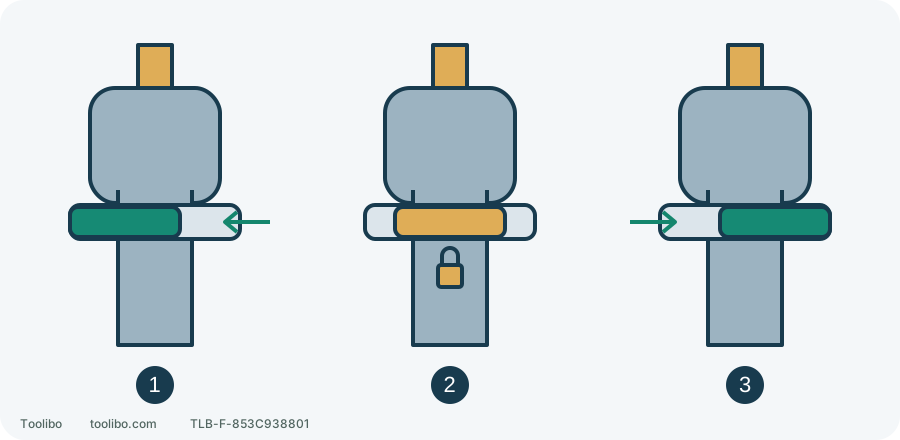
1. Forward position
Button ends left; pressing is from the right side.
2. Centre lock
Trigger locked, not electrically isolated.
3. Reverse position
Button ends right; pressing is from the left side.
Schematic positions only; stop completely before changing direction. Centre lock does not replace battery removal.
Start with the symptom already observed
Do not drive against the stuck screw again to confirm a fault. Was the button impossible to move, unable to stay selected, or already in reverse with the bit turning backward while the screw stayed still? Each points to a different check.
Release the trigger and wait until chuck and accessory stop. Remove the battery before inspection, adjustment or cleaning. Support the tool with the sharp end away from your body. Do not squeeze the trigger while searching for an angle that lets the button move.
Locate the PSBDD02 selector
The selector crosses the housing above the trigger. Hold the handle normally with the nose pointing ahead, away from you, to establish left and right. Do not read these positions while facing into the nose.
From that operating viewpoint, the selector’s final position left of the trigger is forward; right is reverse; centre locks the trigger. These are final positions, not the side from which you press. The selector must be fully left or right for operation, not between positions.
For another model, use its own markings and illustration. These directions are not universal. The top 1/2 slider selects a mechanical speed range, not direction.
Match the symptom to an external check
Swipe or scroll horizontally to see all columns.
| Existing observation | Power-off check | Next step |
|---|---|---|
| Button will not move | Fully released trigger, visible external debris, damaged or distorted housing | Remove only accessible loose surface dirt; stop for service if normal movement remains impossible |
| Button moves but will not stay selected | Full position rather than near centre lock; visible cracks or looseness | Stop if selection remains unreliable; do not hold the button in place while working |
| Bit turns backward but screw remains tight | Cam-out, seized fastener or clutch release | Investigate the fastener, bit and task setup rather than repeatedly moving the direction control |
External cleaning means reachable loose surface dirt only. Do not spray lubricant into the switch, probe it with metal or open the housing to find a linkage. A button requiring a tool to force it has exceeded normal operation.
A stationary screw is not proof of failed reverse
A bit jumping from the recess has lost engagement. Continuing may damage the head first. Stop and check bit profile, size, wear and alignment. Do not compensate for poor engagement by tilting the housing or forcing harder.
Clutch chatter with a stationary bit may concern the setting and load, not direction selection. Stop before adjustment and check that the fastener and material permit the intended operation. Do not respond to a seized screw by maximizing every setting and bracing the tool against your body.
If the head, surrounding material or tool is damaged, stop this removal attempt. Reverse rotation does not provide unlimited removal capacity or replace a suitable damaged-fastener method.
Know when another test is unnecessary
Unreliable direction selection, a wandering button, failed centre lock or cracks around the control require stopping. Remove the battery and leave the fault for inspection rather than repeatedly powering it to reproduce it.
Record the model, current button position, whether it moves with the battery removed and trigger released, and whether the original symptom occurred unloaded or during work. Do not create a hazardous test to fill gaps in the record; existing observations are enough to explain the problem.