
Complete two disconnected checks first
This covers SKIL SR211601. These disconnected consumable and speed-control checks do not replace complete starting and stopping instructions. The available instructions contain inconsistent wording about lifting versus switching off at the end. Until clear instructions applicable to your machine are confirmed, keep it unpowered rather than guessing which order to use.
You can now verify disc size and backing, aligned holes, a flat retained sheet, dial direction and variables for a later trial. Passing those checks does not resolve the operating prerequisite.
Check four features of the abrasive
First, size: the manual specifies a nominal 5-inch/125 mm disc. Obtain an SR211601-compatible consumable rather than treating a different listing’s outer pad dimension as a paper-cutting diameter.
Second, backing: this model uses hook-and-loop attachment, so select the matching disc backing. Adhesive-only paper, another backing system or an arbitrary cut piece is not automatically interchangeable. Torn, brittle or poorly retaining backing is not acceptable merely because it stays on briefly.
Third, align the actual dust-hole pattern; equal diameter does not mean equal holes. Fourth, select abrasive material and grit for the known stock and preparation goal. Unknown coatings, special materials and thin layers need a process and dust plan, not permission from a generic label.
Fit and inspect in this order
- Switch off, wait for all motion and unplug; keep power isolated throughout. Rest the tool upside down on a stable surface without pressing its switch or straining its cord.
- Remove old paper and clear loose dust and coarse particles. Resolve torn, distorted or damaged pad attachment surfaces first.
- Align new-paper holes and outline with the pad, then press the complete contact face firmly into place, not just its center.
- Inspect the perimeter and each hole, and gently check flat retention. If turning the paper blocks holes, realign it rather than drilling the pad.
Acceptance means complete attachment, open intended holes and no trapped grit or lifted edges, not simply having a new disc installed.
What the dial actually establishes
The dial runs from 1, slowest, to 6, fastest. The product lists 7,000–13,000 OPM. There is no per-position calibration for intermediate settings; dividing the range evenly does not establish an exact speed for 3 or 4.
With the plug removed, identify markings and normal dial travel without forcing past stops. Speed is not a power switch: position 1 does not isolate electricity. A jammed, damaged or unstable dial calls for stopping preparation, not repeated powered experiments.
Prepare a later one-variable trial
Only after the applicable starting and stopping instructions are confirmed, and workholding, collection and protection are ready, should a powered trial proceed. Until then, this is a recording plan, not permission to switch on.
Choose known representative scrap matching the task. Record abrasive product, grit, pad condition and starting setting. After the first trial area, follow the confirmed model-specific order to stop, wait and unplug, then compare removal, scratch uniformity, loading and unusual heat.
For another setting, keep stock, abrasive and movement comparable and change only speed. Confirm the switch is off before restoring power. Changing paper, pressure and speed together prevents identifying the cause of a result. This method does not promise a best numbered setting or elimination of every swirl.
Problems that more speed cannot solve
Lifted paper, misaligned holes or trapped particles need isolated installation correction. Loaded or dull paper needs abrasive and process review. Unstable work or a canister striking a clamp needs support or route changes. New deep lines, unusual vibration, odor or excessive heat are reasons to stop, not accelerate.
The goal is a compatible abrasive, an explainable setting and a surface meeting the task. Without a clear stopping procedure, remain disconnected and obtain instructions matching the actual machine rather than using the workpiece to settle the uncertainty.
Disc alignment and dial recognition stay separate from powered operation
An aligned disc and pad, a symbolic 1–6 dial and a disconnected plug illustrate the offline checks.
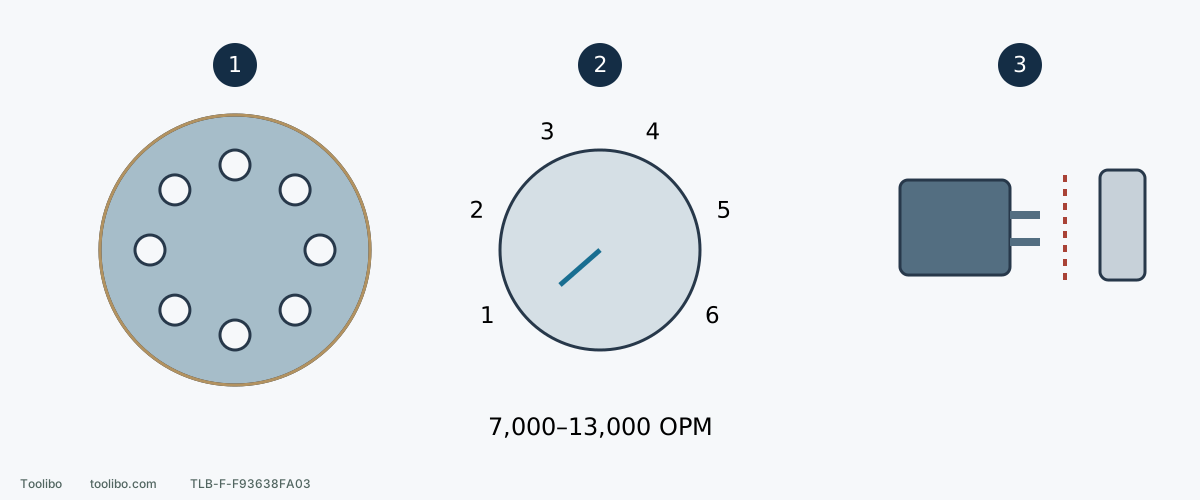
1. Check disc and holes
Use the compatible nominal 5-inch disc; align holes, press the full face and check the perimeter.
2. Recognize low and high
1 is slowest and 6 fastest; the 7,000–13,000 OPM range does not specify intermediate speeds.
3. Keep the trial gate closed until clarified
Keep the plug removed while checking; do not run a trial with the applicable stopping order still unconfirmed.
Dial spacing is symbolic, not a per-position OPM calibration or a prescribed starting setting.
Models referenced