
First rule out conditions that must not be retried
Smoke, a burning smell, abnormal sparks, obvious overheating, damaged wiring or a cracked battery before or after stopping exclude any restart attempt below. Switch off and isolate power when safe. Do not approach, touch or forcibly remove a battery that is smoking, leaking or persistently abnormally hot. Move away and seek emergency help for a developing fire or imminent danger.
Even if nothing happens when you press the switch, return it to OFF before unplugging or normally removing an undamaged battery. The tool may recover unexpectedly during inspection: never hold the switch on while reconnecting power. These checks cover external configuration only, not internal wiring, motor, switch or battery repair.
Identify the model, not a packaging suffix as a fault code
Swipe or scroll horizontally to see all columns.
| Tool body | Power route | First checks |
|---|---|---|
| DEWALT DCW210 | Compatible battery | Battery identity, external condition and correct seating |
| DEWALT DWE6423 | Corded supply | Cord and plug condition, suitable supply and extension cord |
| SKIL SR211601 / SR250801 | Corded supply | Ordinary connections, supply protection and external damage |
Record the complete body model and any DEWALT Type marking. The B in DCW210B identifies a sales configuration, not an error reported by the machine. Recall whether it never started, stopped during work or failed after a battery or work-location change. That history helps order the checks but cannot establish which internal part failed.
Battery tools: inspect only an approved, normal combination
With the tool off and its normal battery removed, confirm that the battery model is approved for the tool. For charging, also check the battery–charger pairing and the charger’s input supply. Physical fit does not establish compatibility. Do not use cross-brand adapters, bridge terminals, improvise internal voltage tests or open a battery housing.
Look externally for cracks, scorching or abnormal distortion. Stop if present; do not install the pack in another tool “to check it.” If undamaged, interpret indicators using that exact charger’s instructions. Charge waiting, temperature delay and fault indications are different conditions, not interchangeable entries in a generic colour chart.
If the only identified issue is a normal compatible pack not seated as instructed, reinstall it correctly with the switch OFF. If it remains unresponsive after correct installation, the charger keeps reporting a fault or the cause is unknown, preserve the condition for service. Do not force a hot battery to charge or defeat protection to investigate.
Corded tools: follow ordinary connections, not live measurements
Unplug the tool before inspecting the cord, plug and extension externally for damage, scorching or loose parts. Stop using damaged items; wrapping them in tape is not a repair. Confirm the intended outlet meets the tool’s voltage and supply requirements. Extension gauge, total length, rating and environment must also satisfy that model’s instructions.
A tool never connected to the correct supply, with everything intact, is an identifiable connection omission. If the outlet, protection or building wiring is uncertain, have a qualified person address it. Do not open an outlet, probe live conductors or use the sander as a circuit tester.
The two SKIL troubleshooting tables include disconnected power, supply protection, cord damage and switch failure as possible causes. Inclusion does not make all of them user repairs: damaged cords and switches require authorized service. Stop for repeated protection trips. Do not repeatedly reset protection or increase its rating to keep the tool running.
When can you restore normal operation?
The issue must be an identified, corrected ordinary external connection omission, with no danger signs, unresolved protection event or visible damage. The applicable start/stop sequence must also be confirmed: while the SR211601 stopping-order conflict remains unresolved, limit it to disconnected checks and do not restore power for a trial. While isolated, complete abrasive, workholding, material and extraction checks and clear the work area. Confirm OFF before restoring power, then follow that model’s specified contact, starting and stopping sequence. This does not require every sander to start off the work or waive differences between models.
If it fails again, the switch is unreliable, unexpected movement occurs or the original problem returns, stop and isolate power rather than repeatedly trying. One successful start does not prove an unexplained electrical fault has disappeared. If the cause remains unknown, keep the tool out of use pending inspection.
Give service the information you already have
Record the full model, Type, battery and charger or extension details, and when it last worked, when it first failed and whether there was a smell or protection trip. Photograph accessible labels and exterior only when safely isolated; do not restart to reproduce the fault for a picture.
Mark and set aside the tool so someone else does not use it. Do not open it to replace brushes, bypass the switch or touch live internals. If it stopped while sanding unknown finishes or suspect materials, resolve that dust risk separately. A running motor does not establish that the original material or extraction arrangement is acceptable.
Two power paths, inspected while isolated
The separated plug and battery represent external identity and seating checks, not energized electrical testing.
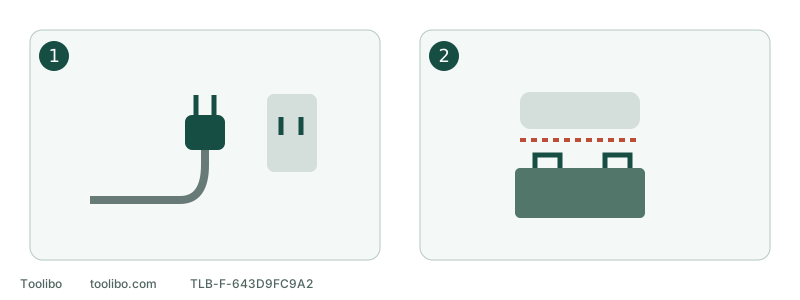
1. Corded route
Inspect intact connections and suitable supply; damaged wiring goes to service.
2. Battery route
Confirm an approved normal pack, not just a shape that fits.
The separated plug and battery represent external identity and seating checks, not energized electrical testing.
Models referenced