
UC18YKSL lamp timing
Four rows show red on-periods on the same three-second scale.
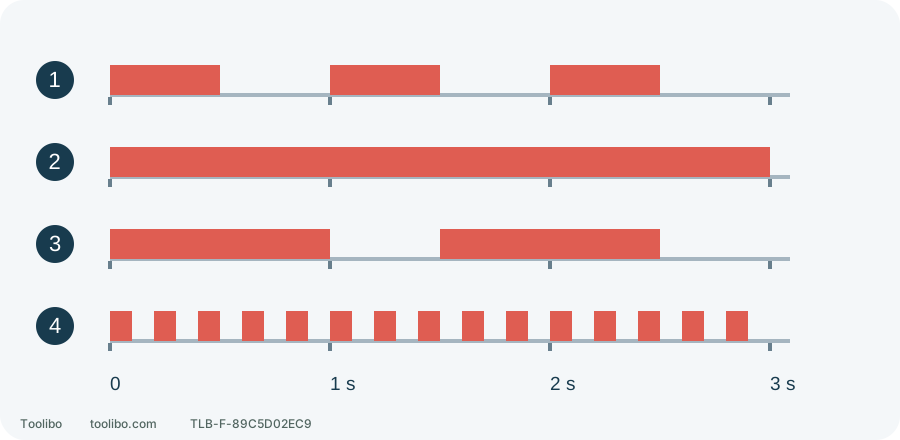
1. Waiting or complete
0.5 s on / 0.5 s off; use the charging sequence to tell them apart.
2. Charging
Continuous red light.
3. Overheat standby
1 s on / 0.5 s off.
4. Charging impossible
0.1 s on / 0.1 s off; stop for a fault.
Red bars mean on; gaps mean off. Waiting and full use the same rhythm.
Check which indicator you are watching
The lamp codes and charge figures here apply to UC18YKSL with BSL1820M in the US/Canada manual, not to another charger that merely looks similar.
Read the charger label and confirm UC18YKSL, the battery model and the required electrical supply. The drill’s work light, battery fuel gauge and charger lamp are separate systems; their codes are not interchangeable.
Inspect the cable, housing and battery for damage. Use a dry, ventilated, stable charging surface with openings unobstructed. Match the battery and input supply. An imported charger may look identical while requiring a different voltage; a plug adapter does not change that voltage.
Five red-lamp states on the UC18YKSL
Swipe or scroll horizontally to see all columns.
| State | Lamp timing | Meaning |
|---|---|---|
| Connected, before charging | 0.5 second on, 0.5 second off | Waiting; flashing alone is not a fault |
| Charging | Continuously on | Leave ventilation clear and wait |
| Charge complete | 0.5 second on, 0.5 second off | Completion after the continuous charging stage |
| Overheat standby | 1 second on, 0.5 second off | Charging waits for the battery to cool |
| Charging impossible | 0.1 second on, 0.1 second off | Rapid fault flashing; stop and investigate through service |
Waiting and complete use the same rhythm. Check whether the battery is inserted and whether a steady charging stage occurred first. Slow flashing immediately after insertion does not, by itself, establish a full battery.
Follow one charging sequence
- With no battery inserted, connect the charger to its rated supply and observe the waiting indication.
- Check that the battery is undamaged and within its charging temperature range, then seat it correctly. Do not force incompatible rails or probe contacts with metal.
- Observe several complete cycles: steady light, a longer on-period, or rapid flashing. A still photograph rarely captures that distinction.
- After normal charging changes to the completed indication, unplug the charger and support it while removing the battery. Pull the plug, not the cable.
For the BSL1820M in this example, the rechargeable temperature range is 0–50°C. At about 20°C, the UC18YKSL’s reference charge time is approximately 60 minutes. Temperature and supply conditions affect it; this is not a failure deadline or a charging time for every battery capacity.
Handle a temperature delay without bypassing it
A battery used heavily or left in sun may show the 1-second-on, 0.5-second-off delay. Let an intact battery cool naturally in a suitable environment. Do not use a freezer, water, cooling spray or repeated reconnection to defeat protection.
If the charging location is too hot, waiting in the same place may not solve the problem. Choose suitable conditions before repeating the normal check. Touch is not a universal temperature test, and an arbitrary number of minutes does not establish readiness.
Stop for an unexplained or recurring fault
Record charger model, battery model, flash timing and when the pattern appeared. Stop using the charging equipment if rapid fault flashing recurs or the pattern cannot be identified. Do not open it, bridge contacts or bypass temperature sensing.
Swelling, leakage, smoke, unusual odour or worsening heat is not an ordinary delay. Keep clear of an active battery incident and obtain local emergency help as appropriate; do not handle or move a battery reacting dangerously. Trying another charger is not a remedy for a damaged battery.