
PCL406: two latches, contact start and full stop before lift
Both battery latches press inward; a front I/O switch precedes a pad resting on wood for starting and stopping.
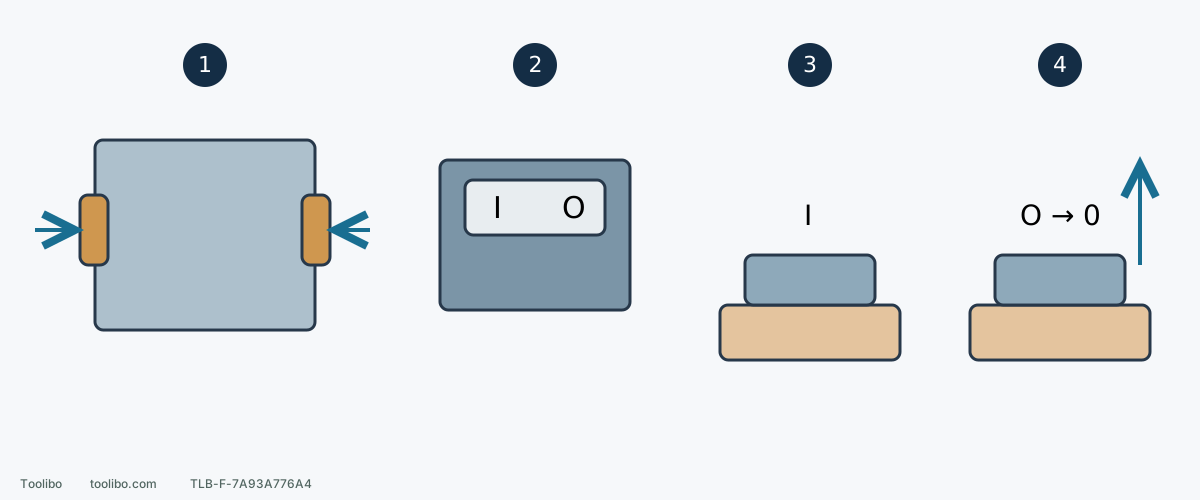
1. Both battery latches
For normal stable equipment, press both to release after shutdown; verify both retain when installing with O selected.
2. Front switch
I starts and O switches off; O does not replace battery removal for adjustments.
3. Contact before I
Place the full abrasive face flat on secured work before starting normal sanding.
4. O, complete stop, then lift
Maintain controlled contact while stopping; remove the battery before subsequent paper or collection handling.
Shapes are symbolic. Zero means no remaining motion, not a dial setting; the upward arrow comes only after complete stopping.
Locate the switch and both latches
These handling steps apply only to a stable tool and battery that can be approached safely. If a battery smokes, leaks or keeps heating abnormally, do not approach, touch its latches or move it merely to follow the removal steps. Move away and seek help under local emergency procedures.
PCL406’s I/O switch is at the front near the leading edge of the top grip. I starts and O switches off. The battery enters the rear port and has a latch on each side; press both to remove it rather than manipulating parts beside the front switch.
With the battery absent, identify these controls and ensure the normal grip permits switch control without covering vents. An obscured, jammed or unreliable switch requires correction before use; battery insertion and removal are not a substitute operating switch.
Stage one: prepare with the battery out
Switch off, wait and remove the battery before installing paper, adjusting collection or inspecting the pad. Use compatible 5-inch hook-and-loop discs with aligned holes, firm full-face attachment and no torn or lifted edges. Secure and support the work and keep bag or hose clear of grip and travel.
Rehearse with the isolated tool: reach the far end, check battery/collector clearance and maintain a stable pad contact area. Move clamps or route hoses now, not after the disc starts.
Stage two: confirm OFF, then fit the battery
- Verify platform compatibility and sound case, connections and latches. Do not use swollen, cracked, leaking or modified packs.
- Confirm O and keep fingers away from the start side while inserting in the intended direction. Do not force sideways or strike the pack.
- Check both latches retain the pack securely against normal movement. A sound at one side does not prove both are engaged.
- If either side fails to retain, remove and inspect orientation, debris and damage. Do not shim, tape or force it with a tool.
With the battery fitted, the sander can start. O does not permit turning paper by hand, clearing holes or adjusting the bag mouth; remove the battery first.
Normal start: contact the whole sheet first
Rest the pad flat on secured work so the entire abrasive face contacts, then press I and move slowly. Keep a normal grip without blocking vents. Let tool weight provide the main pressure rather than pressing heavily to counter vibration or increase removal.
This contact-start order belongs to PCL406. The PCL401 sheet sander starts clear before contact; a shared RYOBI battery family does not make the sequences interchangeable. Ensure appropriate material, paper and support, not a narrow edge offering only a small contact point.
Normal finish: wait on the work after OFF
Press O, maintain controlled flat contact and wait for the disc to stop completely before lifting it from the work. Switching off does not instantly remove motion. Do not import another tool’s lift-before-off habit. Confirm no movement before setting it down.
For paper inspection, cleaning, collection changes or storage, then press both battery latches and remove the pack. Support both tool and battery to prevent dropping. Keep the removed battery dry and away from metal debris that could bridge its terminals.
Do not toggle repeatedly through a fault
If I gives no response, return to O and remove the battery before checking seating and visible connection problems, then follow the battery and charger’s instructions for charge status. Never short terminals or open the pack.
Uncontrollable switching, abnormal sound, odor, significant overheating or mechanical damage calls for stopping. If coast-down after ordinary shutdown seems abnormal, do not stop it with your hand or force it against work. Follow the applicable check or service process. Dedicated brake checks and cooling procedures have their own conditions and are not the normal sequence here.
Resume only after an ordinary external cause has been corrected and no danger sign or unresolved problem remains. Abnormal shutdown, odor or overheating is not cleared for repeated trials by a visual check alone. When resuming is appropriate, restart still begins with O and a correctly retained battery. Switch-off, stopped motion and battery removal solve different problems; keeping their order prevents carrying an unintended-start risk into the next paper change or pickup.
Models referenced