
Cabinet pull holes: keep 96 mm spacing separate from edge setback decision map
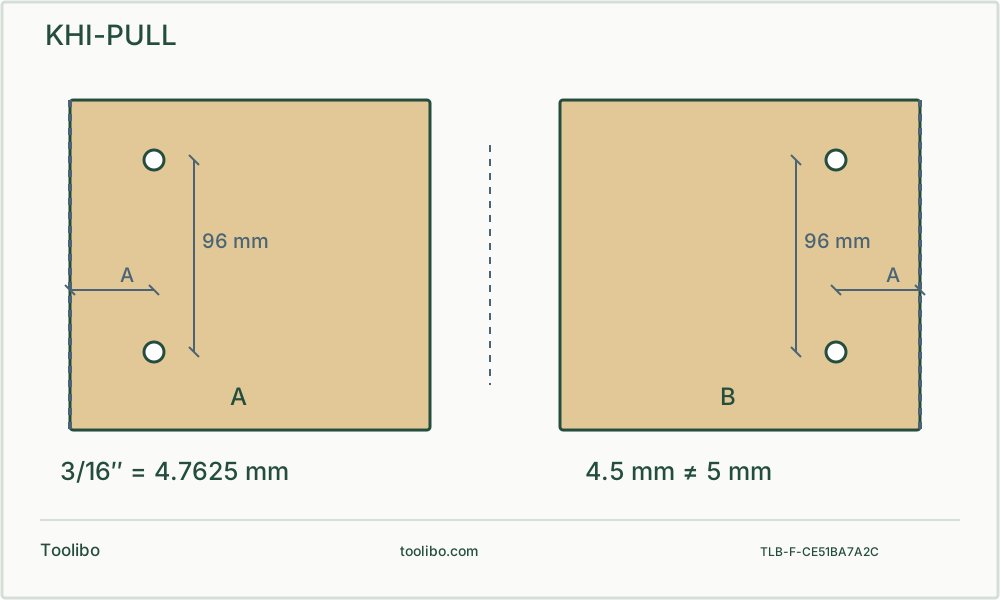
Two front-panel plans show holes 96 mm apart with an independent perpendicular setback; the bit label gives the exact 3/16-inch to 4.7625 mm conversion.
Spacing
Use the actual mounting centres, not overall handle length.
Setback
Set the chosen edge reference independently.
Pair
Start both screws by hand on the sample before repeating.
Original top view shows two 96 mm-spaced centres and an independent perpendicular edge setback arrow, with a second mirrored door whose handle edge is explicitly opposite.
Measure the hardware, not the decorative outline
This example uses a two-hole cabinet pull whose manufacturer specifies 96 mm between mounting centres, with the Kreg KHI-PULL guide described in North American manual NK8792 Version 3, 4/2018. It concerns a removable wooden front with both faces accessible. Check the actual hardware drawing and screws; overall handle length is not the hole-spacing dimension.
Lay the pull on paper or scrap and identify the two threaded mounting axes without scratching the finish. Confirm the specified spacing against the actual item. Do not substitute a nearby inch value because it looks close on a ruler. Two correct-size holes with the wrong spacing can still prevent installation, and tightening screws to pull them sideways can damage the handle or front.
Set centre spacing and setback independently
Fit the two drill guides in the base slots and align their pointers with the matching spacing marks. The manual requires the indexing pegs beneath the pointers to sit in the correct indexing notches before tightening the knurled nuts. A pointer at the mark with its peg perched above a notch is not a locked setting.
Next set the edge guide for the desired distance from the chosen door or drawer edge. The inch and metric references on this jig use different alignment features; follow the correct scale rather than averaging two readings. Mark the front’s intended centreline and identify the reference edge. For a pair of doors, label the hinge side and handle side before moving the jig to the second piece.
Resolve the drill-bit identity before touching the finish
The North American KHI-PULL manual specifies a 3/16 inch bit, while manufacturer pages use inconsistent rounded metric descriptions. A 3/16 inch dimension is exactly 4.7625 mm, not exactly 4.5 mm or 5 mm. Treat those labels as a reason to verify your actual bushing and matching instructions, not as permission to force a larger bit through it.
This example retains the 3/16 inch requirement of the selected manual. Check that the resulting clearance is appropriate for the actual hardware screw. If the bushing, supplied instructions or screw call for a different size, stop and establish the matched combination. Never drill into the jig to enlarge its guide or assume the similarly named Pro jig uses identical parts.
Clamp a representative test assembly
With power disconnected, fit a straight suitable bit and verify retention. Put a clean sacrificial backer against the sample front and clamp the front, backer and jig securely. Keep the edge guide in full contact and the marked centreline visible in the alignment window. Position clamps outside both holes and the drill’s travel.
Provide clearance below the backer for the bit’s exit; backing is not permission to drill into the bench. Use eye protection, secure clothing and appropriate wood-dust controls. Select ordinary rotary drilling rather than hammer mode. Keep the bit aligned with the bushing, use controlled feed and ease pressure near breakthrough. Do not tilt the bit inside the guide to correct a misplaced mark.
Test both holes as a pair
Stop, isolate and remove the sample from its clamps only after the bit has stopped. Clear loose chips appropriately. Offer up the actual pull and start both matching screws gently by hand. Both should enter their own threads without forcing the pull sideways. Verify the handle sits square and the back face has not splintered around the holes.
Swipe or scroll horizontally to see all columns.
| Observation | Check before the finished part |
|---|---|
| Both holes are equally too near an edge | Edge-guide reference or setback |
| One screw starts but the other misses | Centre spacing, guide seating or jig movement |
| Screws start but the handle stays loose | Screw length, washers and threaded engagement |
| Back face chips out | Backer contact and breakthrough feed |
Repeat only from an accepted reference
Once the sample fits, record the spacing, setback, reference edge and bit identity. Mark left and right fronts deliberately rather than turning one over and assuming the setting mirrors itself. Recheck the guide nuts and edge-guide knobs after repositioning and before each visible part.
If a hole is already misplaced, stop and assess a repair or different hardware. Do not rock a running drill to stretch the hole into alignment. Final tightening should follow the hardware instructions and should not crush the front. A successful layout is one where both screws engage freely and the assembly sits correctly, not merely one where the pull hides two oversized holes.