
Range first, then angle and timed light
A drill outline marks the top range selector and foot light controls beside three separate timing lines.
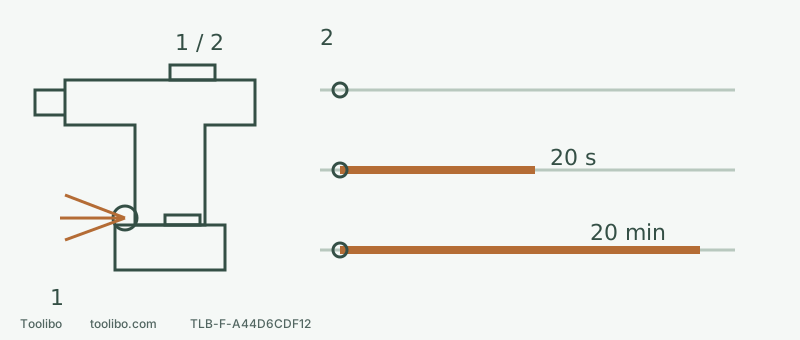
1 · Four different adjustments
Disconnect for range, clutch and head adjustment; head detents aim the beam rather than select brightness.
2 · Three switch modes
Rows are Off, On, spotlight from top to bottom. Off is not isolation. On delays 20 seconds and spotlight 20 minutes; holding the trigger keeps the light on in every mode.
Control locations are conceptual, not exact dimensions. Timing lines are not to scale; they describe after trigger release, not a separate powered-operation instruction.
Locate the four controls
The slider on top selects mechanical speeds 1 and 2. The collar behind the chuck selects numbered clutch settings or drilling. At the foot of the handle, above the battery, a pivoting light head and a separate light switch control illumination. The head has three physical detents for aiming; the switch selects the lighting mode.
This guide concerns the US DCD800 Type 1. If a battery is smoking, swollen, leaking or unusually hot, do not approach or handle it just to inspect it; stop using it and contact the manufacturer. If those danger signs are absent, check ordinary external condition. For normal equipment, release the trigger, wait for rotation to stop, lock the direction button and remove the battery before adjustments or accessory changes.
First set the range and collar for the trial
Use an appropriate driver bit, ordinary wood screw and securely clamped scrap matching the intended material. Select torque-oriented mechanical speed 1 and begin with a low numbered clutch setting. Move the top selector fully towards the chuck for 1, or towards the rear for 2. Never leave it between positions or shift while rotating.
Speed 2 is the high-speed range, not a command to run every small bit at maximum speed. The appropriate range still depends on the accessory, material and task. Trigger travel varies speed within the selected range; it does not replace the gearbox. For drilling, align the drill symbol with the arrow. That mode does not release through the numbered clutch, so it is not the next adjustment when a screw-driving trial needs more torque.
Aim the head, then choose the lighting mode
With power disconnected, move the head into a definite detent aimed at the driver-to-screw contact rather than someone’s eyes. Move the light switch on the foot to the marked position:
Swipe or scroll horizontally to see all columns.
| Mode | Behaviour after releasing the trigger | What it means in use |
|---|---|---|
| Off | Does not use the two delayed-light modes below | Not power isolation, nor a promise of darkness while the trigger is held |
| On | Automatically switches off after about 20 seconds | Short illumination between operations |
| Spotlight | Runs for about 20 minutes | Extended lighting, with additional preparation |
While the trigger is held, the light remains on in all three modes. Around two minutes before the spotlight timer expires, it flashes twice and dims. A nearly depleted battery can also produce two flashes, dimming and subsequent shutdown. The flashes alone therefore do not distinguish timer expiry from low charge. Have separate lighting available when continued visibility matters.
Restore power and check the actual view
Check the accessory is secure, the scrap is clamped and the area is clear. Keep your finger off the trigger while installing a compatible battery and checking its latch. Select the required direction, hold the drill securely, seat the matching driver in the screw and gently press the trigger to begin the trial. Do not spin an unsupported long drill bit just to activate the lamp.
From the real holding position, can you see the recess? Does the chuck or hand block the beam? Does reflected glare hide the head? If necessary, release the trigger, wait for a complete stop and remove the battery before re-aiming the head. Add area lighting if that is still inadequate; do not reach for the lamp while the tool rotates.
Let the screw decide the next adjustment
A screw at the required position, with an intact head and undamaged material, gives a useful trial result. If the clutch releases before seating, stop and disconnect power, increase the numbered setting slightly, then restore and latch the battery with your finger off the trigger as above before testing a fresh position. If the head sinks too far, the recess slips or the material splits, stop and check the clutch, bit, pilot hole and fastener rather than simply increasing the setting.
Record the material, screw, pilot-hole arrangement, speed 1 and clutch position together. A number without the combination is not a reliable setting for another job. The lamp helps you see the result; it cannot assess hidden wiring, pipes or material hazards.
Remove every chuck accessory before standalone spotlight use
To place the tool down as a light, first stop it, remove the battery and remove all accessories from the chuck. Select spotlight while disconnected, then reinstall and latch the battery with your finger off the trigger. With your finger still off the trigger, release the centre direction lock. Hold the tool securely with the empty chuck pointing into a clear area away from people, briefly press the trigger to activate the light, then release it. Wait for the chuck to stop, centre-lock the direction button, and choose a stable position without a trip or falling hazard, and do not direct the beam at eyes. A drill with a bit installed should not be stood casually on a cabinet edge. Disconnect power again before reinstalling an accessory. A lit wall is not a cleared wall, and a trial hole cannot establish what is behind it.
Models referenced