
Compare speed without changing the abrasive
Two matching samples and identical disc symbols have different dial pointers; both lead to a magnified inspection.
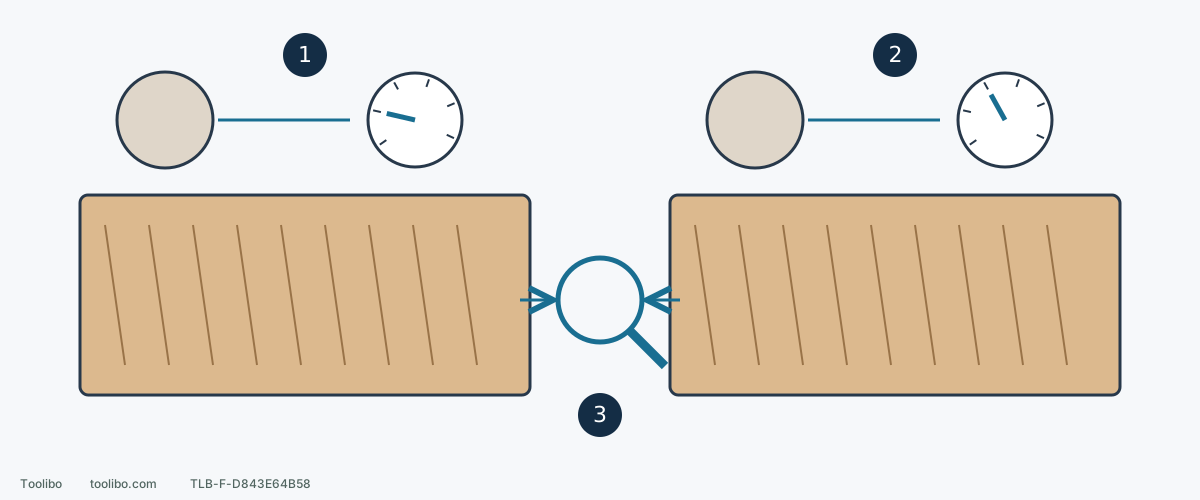
1. Record the first setup
Use a matching offcut and record the pad, abrasive product, grit and starting dial position.
2. Change only speed
Keep material, abrasive and light pressure comparable; stop and unplug before changing the setup.
3. Inspect both surfaces
Compare scratch uniformity and removal, and stop for heat, lifting paper or a new deep groove.
The drawing shows controlled comparison, not measured results or calibrated dial positions.
Decide what needs removing
Distinguish rough bare hardwood from an already prepared face, veneer or old coating. This example concerns identified bare hardwood with enough material to remove, not thin veneer or an unknown finish. Coarse paper can create deep scratches on a face that is already nearly ready.
ROS20VS has a 1–6 speed dial; higher numbers increase orbital speed. Do not confuse it with the fixed-speed ROS10 or treat dial numbers as actual pad-rotation RPM. Locate the dial and I/0 switch while unplugged.
A specific hardwood starting point
The ROS20VS application table gives hardwood rough sanding as dial 4,60 grit and a soft pad, with dial 6,180 grit and a soft pad as the finishing reference. These are starting guides, not instructions to jump directly from 60 to 180 or a universal final grit. Use suitable intermediate grades to remove the previous scratch pattern.
Confirm the actual pad and full part identity. RS033/RS034 hardness names differ between documents, so do not choose an unverified replacement merely to match the table.
Run a controlled trial
- Secure a same-material offcut with comparable surface condition and sufficient thickness. Check fasteners and debris and arrange appropriate extraction and protection.
- Unplug and fit a disc with the correct size, backing and holes. Record pad, abrasive product and grade, then set the chosen starting speed.
- Place the pad flat on the work before pressing I. Do not start in free air and lower a fast-spinning pad onto the surface or add heavy pressure at startup.
- Cover a small trial area with broad, even, overlapping strokes. Keep the pad flat and moving, including near edges.
- For this ROS20VS, gently lift from the work, then press 0 to switch off. Wait for a complete stop and unplug before inspecting the paper and surface. Do not transfer that lift/off order to other models.
Inspect, then change one variable
If roughness reduces evenly, scratches are uniform, the paper is not abnormally loaded and contact remains controlled, continue that stage. When its removal target is met, progress to the next appropriate grade instead of adding pressure for speed.
For slow removal, inspect for worn or loaded abrasive before deciding a coarser grade is needed. Pressing harder can restrict pad rotation, create heat or produce uneven marks.
A new isolated deep scratch, local heating, lifting paper or sudden vibration calls for stopping and disconnected inspection. Correct debris, loading or fit before retrying. Not every fault is a speed problem. Do not change both grit and speed during the same comparison.
Keep a useful record
A trial note might read: bare hardwood / verified soft pad /60 grit / dial 4 / even scratches, no abnormal loading. This illustrates the record, not a test result for your wood. Change one item on the next trial.
Before finer sanding, remove loose dust and check that older coarse scratches are gone under changing light. The final grade must suit the chosen finishing system; a tool application table is not permission to keep removing material merely to reach a higher number.
Models referenced