
Separate paper, not pad layers
Normal peeling lifts only the paper; movement of the pad layers means stop.
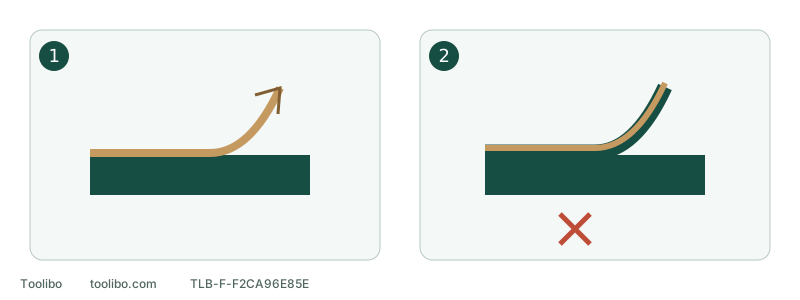
1. Paper releases
With power disconnected, peel progressively from an accessible edge.
2. Pad begins separating
Stop pulling; do not heat, dissolve or force the stuck paper.
Normal peeling lifts only the paper; movement of the pad layers means stop.
Identify adhesive paper first
GSS20-40 accepts clamped paper and pressure-sensitive adhesive (PSA) paper. Releasing the clamps does not release an adhesive bond. Its listed PSA sheet is 4-1/2 × 4-1/2 inches; ordinary clamped paper is 4-1/2 × 5-1/2 inches. Do not treat them as the same cutting size.
If the installed system is unclear, inspect its packaging and backing rather than inserting a blade between paper and pad.
Remove paper that still releases normally
Switch off, wait for all movement to stop and unplug. Prompt removal never means grabbing moving paper. If components are too hot to touch safely, do not handle them just to hurry.
- Lift an accessible paper edge gently with a fingernail, not a knife or screwdriver.
- Peel progressively from the separation line instead of pulling sharply at one point.
- Stop if the backing tears into the pad surface or the pad edge lifts with it. More force may turn paper replacement into pad replacement.
- Inspect the exposed pad for residue, missing material or separation. Remove only permitted loose dust; do not scrape bonded adhesive as if it were sawdust.
Completion means the old sheet is removed without pad damage and the next suitable sheet can be installed normally. Covering residue with fresh paper is not a completed repair.
If it has cooled and bonded hard
Do not force it off or improvise with a heat gun, external heater, solvent soak or cleaner poured into the joint. Compatibility of pad materials with those methods is not established.
The GSS20-40 08/18 instructions describe further sanding to soften a forgotten adhesive sheet, but that revision contains conflicting startup-position instructions. This article therefore does not turn that passage into a powered removal procedure. Keep the tool out of use and obtain the applicable method from Bosch or suitable service support, including the correct operating sequence. Another sander’s startup method does not resolve the conflict.
Distinguish residue from damage
Swipe or scroll horizontally to see all columns.
| Observation | Next step |
|---|---|
| Loose dust only; intact pad | Use permitted light cleaning and check normal fit |
| Bonded glue or paper remains | Confirm a suitable removal method; no layering or scraping |
| Lifted surface, missing edge or separated layers | Stop and identify the correct pad or service route |
| Unsure whether residue or pad material | Take clear photographs before further work |
For help, record tool and service identity, paper identity, how long it remained attached and any attempted cleaning. Photographs distinguish a whole bonded sheet from isolated residue.
Prevent the next hard bond
Do not store the tool with PSA paper fitted. After normal work, stop safely, disconnect and remove it promptly, then inspect before storage. Keep both clamps latched even with PSA, and remove loose debris before installing paper.
If frequent grade changes make adhesive paper inconvenient, consider the ordinary clamped sheets permitted for this model and follow their clamping and punching procedure. Do not add an unapproved hook-and-loop conversion layer simply for convenience.
Models referenced