
Main-handle compartment and separate coin cell
The side compartment aligns with module, coin cell and cover; the plastic placeholder is shown separately.
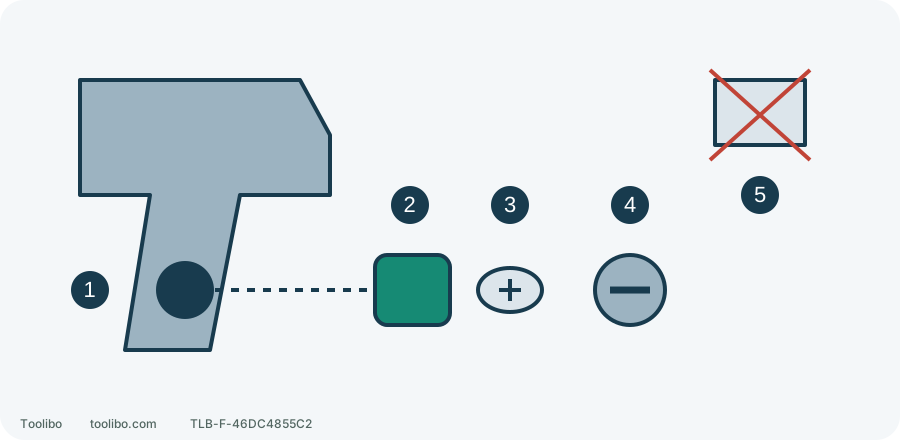
1. Side compartment
In the main handle, not in the auxiliary handle.
2. GCY42 module
Confirm actual presence, not just a Ready label.
3. Coin cell
Specified CR2032 with positive face upward.
4. Secure cover
If it cannot close securely, stop using the tool.
5. Placeholder
Remove for module installation and keep separately.
Exploded identification schematic, not insertion direction or dimensions. Disconnect the main pack; do not stack the placeholder with GCY42. Secure the cover before power.
Do not read readiness as installation
Connected-Ready means provision for a module, not necessarily a supplied or installed module. GSB18V-975CN is the sales model containing GSB18V-975C; GCY42 is a separate purchase. A used or split-kit tool may already have been modified by its owner, so packaging alone cannot establish its present configuration.
Record the housing model, tool identifier and whether the order explicitly included GCY42. Establish module presence, power and actual app recognition rather than merely finding a Bluetooth logo.
Find the compartment beside the handle
This tool’s module compartment is on the handle side, under a cover turned with a suitable flat screwdriver or coin. The drill’s main battery and the module’s separate coin cell serve different purposes.
Release, wait for stop, centre-lock and remove the main pack. Support the tool away from children. Facing the cover, turn it a quarter-turn counterclockwise and remove it. Do not pry open the housing or insert unsuitable pointed objects.
Swipe or scroll horizontally to see all columns.
| What is inside | Meaning | Next step |
|---|---|---|
| Plastic placeholder, no GCY42 | Provision exists, module absent | Obtain the correct GCY42 if connectivity is wanted |
| GCY42 without coin cell | Module present, power preparation incomplete | Use only the specified 3V CR2032 lithium coin cell |
| Module and coin cell present | Hardware present, not proof of connection | Check installation and cover, then identify the tool in the app |
| Damaged components or a cover that cannot close securely | Not a software problem | Stop; do not tape it shut for use |
Do not pull an installed module out merely to read a mark. For a coin-cell change, remove the cell, not the GCY42 itself.
Secure the compartment before anything else
For first installation, remove and keep the plastic placeholder, fit GCY42 in the correct compartment orientation and place the specified CR2032 above it, positive side up. Refit the placeholder if the module is later removed. Never substitute another cell type, stacked cells or an external supply.
Replace the cover and turn a quarter-turn clockwise to lock. Check that it stays secure without lifting or loosening. If it cannot close securely, stop using the product, remove the battery and keep it away from children; never operate with an open coin-cell compartment.
Keep new and used coin cells inaccessible to children. Suspected swallowing or entry into the body requires immediate medical attention, not waiting for symptoms. Do not leave removed cells on a bench, in a bag or on the floor.
US users should use current PRO360 guidance
Bosch’s US connectivity services moved from Toolbox toward PRO360 starting June 2025. Old printed instructions may still show Toolbox or My Tools. A changed app name does not by itself identify a wrong tool or module.
Use the official PRO360 route for your region and distinguish adding an asset from connecting a nearby tool. Scanning a label into inventory creates a record; it does not prove a Bluetooth link to the physical GSB18V-975C in front of you.
Once the compartment is secure, follow the current app’s preparation prompts. If tool power is needed, first provide a safe clear area; do not energize with the module compartment open. Do not repeatedly free-run the drill just because discovery fails. After connection, check the actual model and available controls rather than borrowing another Bosch tool’s features.
For the current US PRO360 interface, switch on phone Bluetooth, choose Connect, review and grant the Bluetooth permission needed for pairing, select the plus beside the correctly identified tool, then Done. Confirm that its product page exposes the supported controls. Menu labels can vary with app language and version; features such as Favorite modes on other tools are not promised for this drill.
Finish with a concrete configuration result
A Connected-Ready bare tool with a plastic placeholder but an inventory record is registered, not module-equipped. That does not establish a failed radio or a need for another phone.
If correctly installed GCY42 and cell, with a secured cover, are still not recognized, record tool and module models, app version and phone system for Bosch support. Separate hardware, power and software status before changing any protective setting.
Connectivity provides supported settings and information. It does not clamp the work, install an auxiliary handle or establish kickback protection at every speed. Connection status and safe working preparation remain separate checks.
Models referenced