
Installation and tracking are separate
The arrows check belt direction; the running centreline is adjusted with the dedicated knob. This is not a knob-location or rotation-direction drawing.
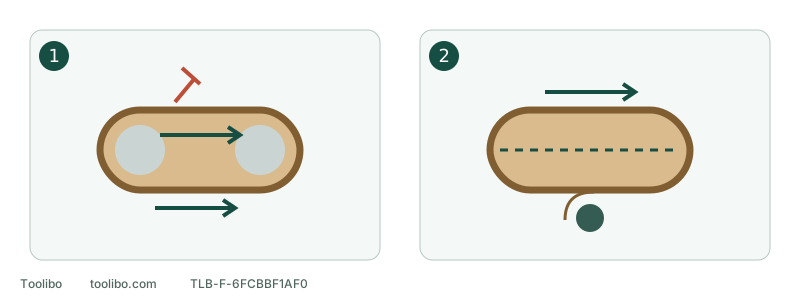
1. Unplugged installation
Match belt and tool arrows, then restore tension before reconnecting.
2. Running tracking
Only the tracking knob is adjusted; hands stay clear of belt and rollers.
The arrows check belt direction; the running centreline is adjusted with the dedicated knob. This is not a knob-location or rotation-direction drawing.
Identify the two controls
The 9403 uses a 4 × 24-inch belt, listed metrically as 100 × 610 mm. The tension lever releases the belt for fitting; the tracking knob changes its running position. Never release tension with the belt moving or push the belt sideways with a finger.
This is specific to 9403. The 9921 has a different belt width, and another model’s knob direction or permitted offset is not a 9403 specification.
Check installation with power disconnected
- Switch off, wait for stopping and unplug.
- Check width, loop length, seam and edges. Replace torn or frayed belts rather than trying to track them into continued use.
- For refitting, pull the tension lever fully out and install the correct belt over the rollers.
- Match the arrow on the belt backing to the tool arrow, then return the lever. Do not stretch an incorrect belt or modify its joint.
- Check the accessible path for obstructions and obvious skew. A damaged frame or tension mechanism needs attention before operation.
A stationary belt positioned centrally has not yet demonstrated stable tracking.
Use only the tracking knob while running
With the tool still unplugged, check normal switch actuation and return, and keep the cord and loose objects clear of the belt path. After the fitting, tension and clear-path checks, confirm the switch is OFF, then reconnect power. Hold the tool securely and start with the belt clear of the workpiece. Keep hands and clothing away from the belt and rollers; do not improvise an upside-down bench mounting.
Only if you can retain control, see the belt and reach the designated knob without approaching moving parts, make a small tracking adjustment. Observe the response before another adjustment. Do not make a large continuous turn or assume a universal clockwise correction.
The aim is centred travel without continued frame rubbing or new edge damage. Do not import another model’s clearance value. If the knob is unclear or reaching it compromises control, obtain competent practical guidance instead of experimenting while running.
Stop before a tracking problem causes more damage
Swipe or scroll horizontally to see all columns.
| Observation | Action |
|---|---|
| Frame contact or fraying | Stop completely, unplug and inspect fitting and belt |
| Continued wandering despite small adjustment | Stop and recheck belt identity; do not continually chase it |
| Unusual vibration, noise or damaged mechanism | Keep out of use and arrange service |
| Correct replacement belt also will not track | Use the service route, not internal roller or drive repairs |
Touch or refit the belt only after full stopping and disconnection. Do not wedge the knob, remove guards or hold the belt in position by hand.
Return to normal sanding only when stable
For the 9403, hold the tool securely, reach operating speed before gently contacting the secured suitable workpiece, and keep the belt flat and moving. Lift clear before switching off, then wait for stopping before setting down. Body weight does not stabilise a wandering belt.
Tracking does not repair a torn belt or certify internal condition. Record the belt specification, when wandering began, whether it followed replacement and the disconnected inspection result for further troubleshooting.
Models referenced