
Read both PCG002 lamps together
Four two-lamp rows distinguish evaluating, error, charging and complete.
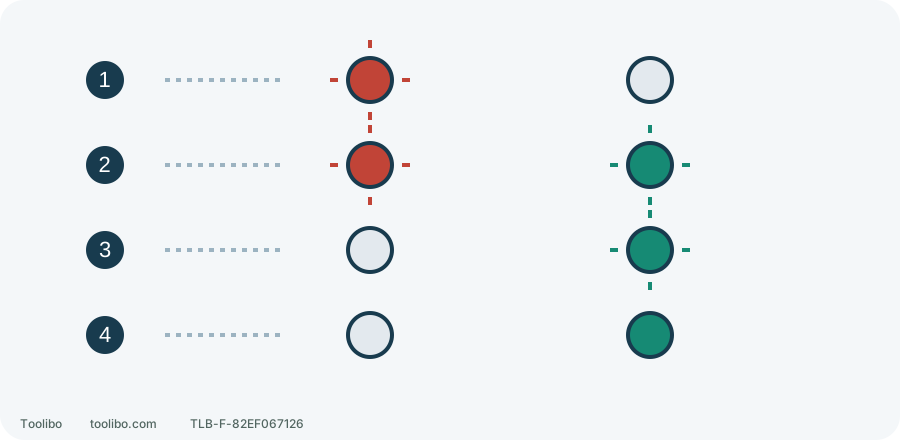
1. Evaluate
Red flashing alone can mean hot, cold or deeply discharged.
2. Error
Both flash: battery or charger fault, not normal charging.
3. Charging
Red off, green flashing.
4. Complete
Red off, green steady. Remove the battery as instructed.
Left red, right green; rays mean flashing and pale circles mean off. Symbolic, not the physical lamp layout or timing. All-off during charging is a separate stop condition.
Exclude equipment that must not be tried
A smoking, hissing, leaking or rapidly and abnormally heating battery means move clear and follow local emergency guidance. Do not move it to read labels, change chargers or test runtime. Broken, liquid-exposed or impact-damaged batteries, tools or chargers must not be connected for a trial.
The following assumes stable equipment safe to handle. Release the trigger, wait for standstill, centre-lock the direction selector and remove the battery before reading the separate tool, battery and charger labels. Record full models and suffixes, not merely “18V”, “ONE+” or “HP”. This covers supply checks for North American PSBDD02, PBLDD01 and PBLHM101, not adapters, altered interfaces or cell repairs.
Understand pairing through one actual kit
The US PSBDD02K2 inclusion list specifies a PSBDD02 drill, two PBP002 1.5 Ah batteries and a PCG002 charger. One kit code therefore leads to three component identities. Two batteries allow rotation, not combining voltages or modifying outputs.
Swipe or scroll horizontally to see all columns.
| Component | Confirm | What it does not establish |
|---|---|---|
| PSBDD02 tool | Complete model matches its instructions | A similar-looking tool uses the same controls |
| PBP002 battery | Actual label, sound condition and specified pairing | Any brand with an 18V label fits |
| PCG002 charger | Applicable revision, input supply and charging instructions | Other red/green chargers have identical light meanings |
If a used kit has another battery or charger, do not retain the original-box conclusion. Check the changed combination against the tool instructions and correlation supplement 987000-432. If documentation cannot confirm it, provide all three exact models to RYOBI before deciding. This K2 example is not a contents list for every market, year or similarly named kit.
Compatibility is not advertised performance
PBLDD01 performance claims combine a brushless motor, electronics and a High Performance lithium battery. An approved ordinary ONE+ battery does not therefore carry the same peak-output or runtime promise. Resolve compatibility first, then consider load, session duration, weight and clearance instead of choosing only the largest Ah number.
For short cabinet screwdriving, battery shape may matter more to grip than theoretical runtime. Sustained heavier work needs workload and cooling within tool/battery conditions. Without matching task, accessory and battery conditions, “HP” does not establish that every job is faster or cannot cause a shutdown.
Check both latches during actual fitting
- With the battery removed, inspect its housing, both latches and guides for cracks, distortion or obstruction. Do not probe contacts or use metal tools or liquids to establish conduction.
- Keep centre lock selected and your finger off the trigger. Insert the confirmed compatible battery normally along its guides until both latches engage.
- Without pulling the trigger, confirm retention on both sides and that it cannot fall out. One-sided engagement, obvious looseness or poor seating means do not start.
- If still safe to handle, release both latches and remove it to check model and visible obstruction. Tape, ties, supporting it by hand or force are not substitutes for locking.
Normal fitting is only preparation. Check accessory, gear, direction and workholding next. Do not verify an insecure battery or unclear controls by repeatedly pulling the trigger.
PCG002 example: supply first, then both lights
This section applies only to PCG002/PCG002SB30 manual 998000213 REV06. This US version needs 120 V AC, 60 Hz, not an incompatible local supply. Its instructions prohibit use, storage or charging below 10°C or above 38°C. That is not publication of all internal cell-sensor thresholds or a universal range for other chargers.
Use a dry, ventilated area with clear vents, away from combustibles. After confirming battery suitability and supply compatibility, connect the charger, align battery ribs and grooves, insert and confirm latch engagement. Do not charge a wet, previously liquid-exposed, damaged or abnormally heating battery.
Swipe or scroll horizontally to see all columns.
| PCG002 red / green | State | Interpretation |
|---|---|---|
| Steady / off, no battery | Powered and ready | Not charging an absent battery |
| Flashing / off | Evaluating | Hot, cold or deeply discharged are possible; the light alone does not distinguish them |
| Flashing / flashing | Error | Battery or charger fault; stop and arrange checks under the correct instructions |
| Off / flashing | Charging | Continue observing equipment and surroundings |
| Off / steady | Complete | Release latches and remove as instructed |
Sound equipment may proceed automatically from evaluation to charging, but damage or abnormal heating is not made safe by automatic control. If all lights go out during charging, the manual says remove the battery, do not insert another, and take battery and charger to authorised service. Ordinary removal still requires safe handling conditions. Record the three models and both lights’ actual state instead of repeatedly swapping batteries to collect faults.
Models referenced