
Two activation routes, two idle timers
A foot worklight button is marked separately from the trigger; two lines compare trigger and button activation timeouts.
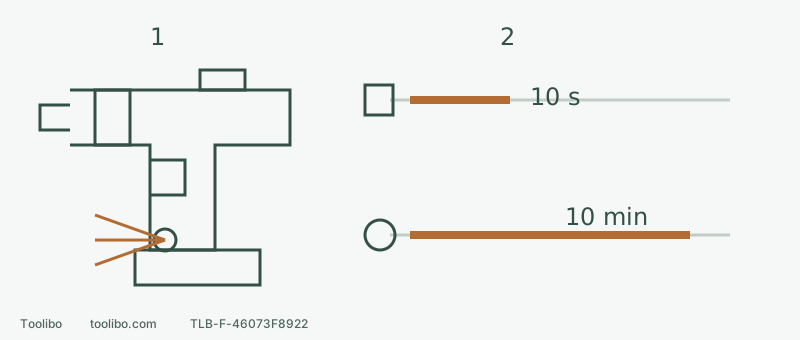
1 · Use the independent button while stopped
Keep fingers off the trigger; press WORKLIGHT to switch the lamp without running the motor, and press again while stopped to turn it off.
2 · Do not confuse timing with permission
The button is disabled while running. Abnormal flashing needs a stopped-task assessment, not repeated button presses.
Not to scale. Upper line: trigger activation, about 10 idle seconds. Lower: button activation, about 10 idle minutes. Neither line promises battery runtime.
Identify the tool separately from its kit
If the battery is smoking, leaking, swollen or unusually hot, do not approach or handle it to read a label; stop and contact SKIL. Otherwise record the tool’s DL6293B-00 identity and the full package code. The manual filename includes -10, -00 and -1C, while the operating cover identifies DL6293B-00. That helps select instructions, not prove identical box contents.
For normal equipment, release the trigger, wait for a complete stop, centre-lock the direction and remove the battery before accessory installation and mechanical adjustment. Compact size does not justify gripping less shank or trapping fingers against a cabinet. Count the actual battery, accessory length and exit route.
Set the three mechanical controls first
The top slider shows 1 for lower speed/higher torque and 2 for higher speed/lower torque, with no-load ranges 0–500/0–1,800 rpm. The manual includes driving and appropriate metal/plastic work among low-range applications; suitable lighter wood and composite drilling may use high range as the accessory permits. A material name does not waive diameter, accessory or operating checks.
The collar behind the chuck has positions 1–17 plus drilling. Numbers tune screw-driving action; drilling is not a rescue setting for a difficult screw. More trigger pressure gives more speed within the chosen range. Stop completely before shifting or turning the collar; this preparation also removes the battery.
Fit a clean, centred bit and follow the chuck’s OPEN/CLOSE marks to hand-tighten it on suitable shank, not cutting flutes. Never grip the chuck and power the motor to tighten. After installation, restore the mode needed for the task rather than accidentally leaving the installation drilling position selected for a screw trial.
Use the separate light button without rotating the motor
The WORKLIGHT and its button are on the foot near the battery. First prepare accessories, position and mechanical settings with power disconnected. For lighting alone, remove chuck accessories before preparation to avoid a sharp-point hazard. Install and latch the specified battery with your finger off the trigger. Keep the tool stopped; the direction selector may remain centre-locked. Press WORKLIGHT to illuminate without pulling the trigger.
To switch it off manually, press WORKLIGHT again while the tool is not running. If you were operating, release the trigger and wait for a complete stop first. The button is disabled during operation; pressing harder does not fix that.
Two activation routes have different timeouts
Swipe or scroll horizontally to see all columns.
| How the light starts | Automatic result after inactivity | Manual switch-off |
|---|---|---|
| Trigger operation | Off after about 10 seconds | Press WORKLIGHT with the tool stopped |
| WORKLIGHT button while stopped | Off after about 10 minutes | Press the button again while not running |
These are idle timers, not promised working duration. Rapid flashing can accompany overload or excessive temperature; it does not uniquely identify which. Slower flashing indicates low battery charge. Release the trigger and stop the task for abnormal behaviour, responding to the actual condition. Independent illumination is not permission to continue working, and a lit surface does not clear hidden services.
Finish with a screw-driving check
Use matching clamped scrap, an ordinary compatible screw and driver, and the required pilot hole. Disconnect power to select mechanical range 1 and a low numbered clutch. Clear the area, install and latch the battery with your finger off the trigger, release the centre lock and choose the correct driving direction. Seat the bit before starting smoothly.
Record the combination when the screw seats as required without head or material damage. For early clutch release, stop and disconnect, check the driver and pilot hole, adjust slightly and restore battery and direction fully before another attempt. Slipping, splitting, binding or unusual heat or smell means stop and identify the cause, not simply increase the number.
Treat charger power as a separate purchase check
The recorded DL6293B-1C description says 45 W USB-C charger, while its box-content list says 100 W. Do not silently choose the larger number to estimate charging time. Ask for the actual charger and battery models, matching instructions and order configuration. Identical USB-C connectors do not establish compatibility. This packaging question is separate from the controls above; do not fill an unresolved configuration with an unidentified power supply.
Models referenced