
Read the screw result, then the charger
Three screw-depth sections and a separate green flashing charger indicator.
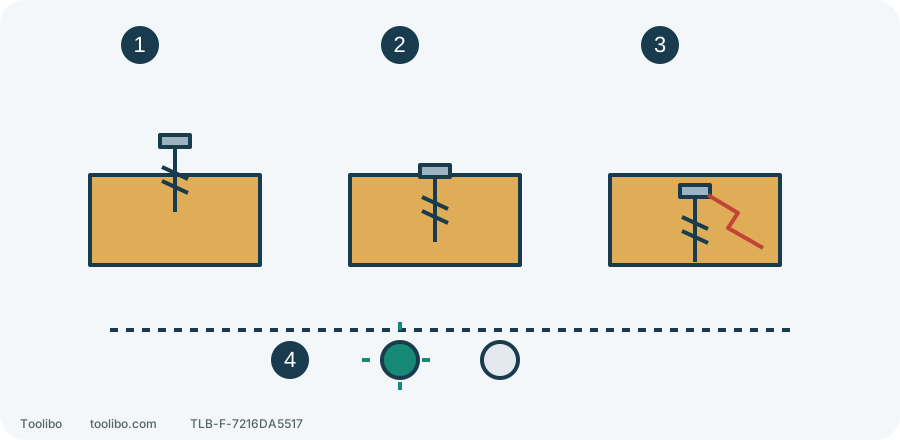
1. Not seated
If the clutch releases early, isolate and check pilot and fit before a small adjustment.
2. Target depth
Retain only for the same sound material and screw conditions.
3. Excess depth or splitting
Stop and correct the cause, not more clutch or force.
4. QC536001 charging
Green flashes while red is off; use the exact charger table.
Conceptual depth and damage, not screw-head geometry or dimensions. Rays mean flashing, not a timed flash count.
Identify all three components
This guide concerns the US DL529301 drill and preparation with a BY519702 battery and QC536001 charger. The DL529302 kit download contains a separate manual for each. A carton name is not every component’s model number. Approach and check actual labels only when the equipment is stable and safe to handle, especially on a used kit; a substituted charger does not inherit the light meanings below.
This QC536001 version requires 120 V, 60 Hz input. It is not a universal charger to try on any country’s supply. Match the nameplate to the local supply before plugging in. A smoking, leaking or rapidly and abnormally heating battery calls for moving clear, not the routine handling and charging below.
Remove the battery before normal bit fitting
- Release the trigger, wait for complete standstill, put the direction selector in its centre lock position and remove the battery. Centre lock restricts the trigger but does not isolate power.
- Following this model’s fitting procedure, turn the torque ring to the drill symbol. Looking from the chuck nose toward the tool, open the jaws counterclockwise by hand.
- Check that the shank is clean, undamaged and compatible. Insert a small drill up to the start of its flutes, with jaws on the shank; insert a large drill as far as it will go as specified. Do not grip an unsuitable shoulder or force a crooked accessory straight.
- From the same front viewpoint, turn the chuck clockwise and tighten securely by hand. Never grip the chuck and run the motor to tighten it.
- Still isolated, check for obvious misalignment, looseness or pull-out. Reseat a poor fit; repeated slipping, damage or abnormal movement means stop for inspection, not paper shims.
Let a hot bit cool before handling it. The temporary drilling setting used for fitting does not mean leaving that mode selected for the next screw.
Set gear, clutch and direction separately
The top mechanical selector provides gear 1, the low-speed/high-torque range for screws and heavier loads, and gear 2, the higher-speed/lower-torque range for lighter work such as suitable wood holes. Shift only after the tool stops completely; keep the battery removed during accessory preparation.
There are 17 numbered clutch positions plus drilling. Numbers are repeatable trial settings, not readings in newton-metres. Drilling locks the clutch and is not a way to conceal why a screw will not advance. The direction selector controls forward/reverse independently of gear and clutch.
The DL529301 manual specifies no-load ranges of 0–480 and 0–1800 rpm. A product-page reference to 1450 RPM does not establish an upgraded or slower tool in your hand. Match tool and manual first. Accessory limits, material and diameter still govern working speed; none of these maxima requires a fully depressed trigger.
Find a working setting with one screw
Clamp nonstructural scrap matching the actual material and thickness, and prepare the pilot required by the screw. With the battery still removed, fit the matching driver, choose gear 1 and a low numbered clutch setting, and select correct driving direction from the tool markings.
Keep your finger away from the trigger while aligning the compatible battery’s ribs with the tool grooves and inserting it; confirm the latch is secure. Seat the driver fully along the screw axis and pull gently to drive slowly. Release as the target depth approaches.
Swipe or scroll horizontally to see all columns.
| Trial result | Next action |
|---|---|
| Clutch releases before the screw seats | Stop, remove the battery and check pilot and fit first; if sound, increase the clutch one small step |
| Correct depth with sound recess and wood | Keep the setting for the same conditions; trial again after changing material or screw |
| Excess depth, splitting, cam-out or stalling | Release, stop and isolate safely to investigate; do not keep increasing settings |
After every adjustment, recheck accessory, controls and workholding, then reinstall and secure the battery with your finger off the trigger before another trial. An unexplained or recurring problem means stop using the tool and arrange inspection.
Read QC536001 lights as charger-specific signals
Charge only a matching, undamaged battery suitable for charging. Use a dry, ventilated place clear of combustibles, and keep liquid out of both devices. This charger specifies rapid charging with the battery at 5–35°C. Let a battery heated by heavy work return naturally to the permitted range; do not use heaters, ice water or shorted terminals to hurry it.
On connection to the nameplate-compatible supply, red and green illuminate for about 1 second and go out for self-inspection. Align battery ribs with charger grooves and insert correctly, rather than repeatedly forcing insertion to cure a fault.
Swipe or scroll horizontally to see all columns.
| QC536001 display | Meaning and action |
|---|---|
| Flashing green, red off | Normal charging |
| Steady green, red off | Fully charged; remove the battery as instructed |
| Steady red, green off | Battery too hot or cold; remove only if safe to handle and wait for the permitted temperature |
| Flashing red | Battery, charger or connection fault; not normal charging and not enough to identify which component failed |
An unlit red indicator alone does not prove there is no fault; stop charging if the charge state or self-inspection is abnormal. No normal power-on self-inspection, a recurring fault indication or damaged equipment means stop charging and contact SKIL for inspection. Record exact battery/charger models and the colour and steady/flashing state rather than reporting only that the drill will not charge.
Models referenced