
Fixed-speed body, separate disc checks
Original diagram separates BO5030 fixed-speed identity from disc diameter, eight extraction holes and a flat supported sample.
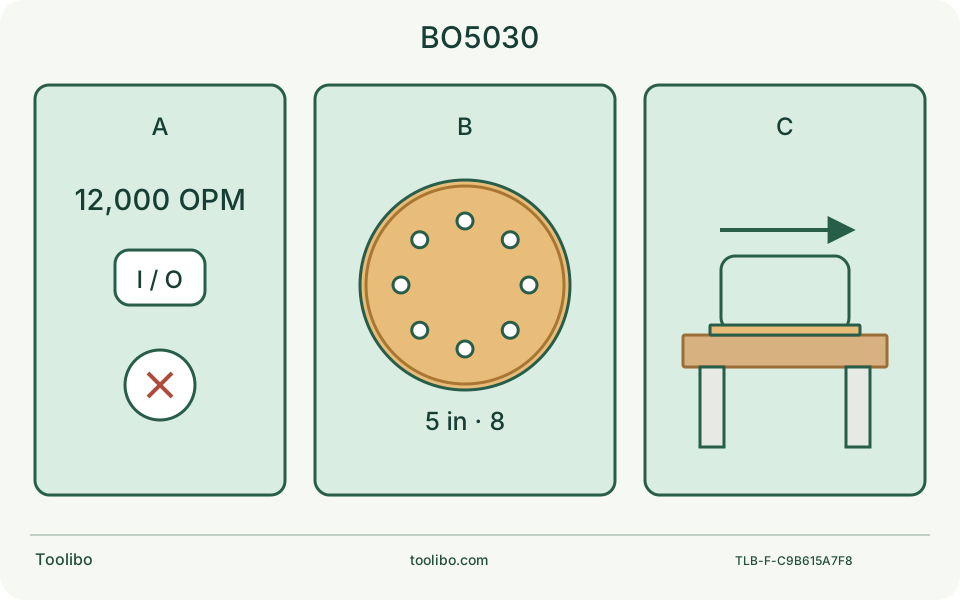
Identify
BO5030 has no speed dial.
Fit
Check all eight holes and hook-and-loop attachment.
Trial
Inspect a supported sample before expanding the work.
The disc sketch shows the required relationship, not a dimensioned replacement-pad drawing or a measured sanding result.
Identify the body before reading the shared manual
The US BO5030 listing links a document named BO5031K, but the document covers BO5030 and BO5031. That file name does not turn your machine into the adjustable-speed model. Read the model column and section qualification, then compare the actual label and controls. BO5030 is a corded, fixed-speed random-orbit sander; a case or package suffix does not add a dial.
The US listing gives 3 A input, 12,000 OPM and a nominal 5-inch, eight-hole hook-and-loop abrasive. These describe supply demand, motion and consumable fit, respectively. None establishes how quickly your board will finish or how much coating it is safe to remove. Match the supply to the physical nameplate rather than importing another country’s BO5030 electrical specification.
Buy the disc, not the backing-pad measurement
The product table distinguishes a 4-13/16-inch backing pad from a 5-inch abrasive disc. Order the specified abrasive format rather than trimming paper to the smaller pad dimension. Verify diameter, fastening, hole pattern, grade and material suitability together. A plain adhesive-backed disc is not the standard hook-and-loop setup, and merely covering the pad does not establish a secure attachment.
There is a documentation mismatch: the linked shared manual describes peeling a backing sheet and warns against reusing a removed disc, while the current US product page explicitly specifies hook-and-loop. Do not combine those fastening instructions. This guide identifies the current listed format; if your pad, packaging or supplied instructions differ, obtain model-specific clarification before fitting an abrasive.
Disconnect the plug before checking the pad. Remove the used disc and inspect for tears, missing hook material or a damaged pad edge. Seat the new disc centrally with the extraction holes aligned. Do not punch improvised holes while it is mounted, stack extra discs as cushions or continue when an intact correct disc will not hold. Those observations require the right replacement or service decision.
Make a sample that answers a practical question
For a known, uncoated solid-wood board, secure matching scrap on a stable support. Identify the next finish and its preparation requirements before selecting grit. Mark the area to inspect, arrange grazing light and keep the cord and dust bag clear of clamps and travel. Do not make an unknown old coating or a valuable veneered face your first test piece.
Start with the prescribed dust collection fitted, appropriate eye, hearing and respiratory controls, and a clear path for your hands. Following the matched manual, switch on and let the tool reach speed before gently placing the pad flat on the work. Keep it moving with light pressure. Holding the edge down to erase one scratch changes the surface geometry rather than providing a useful test of the grit.
Fixed speed means change the plan, not the electronics
If the first sample scratches too deeply, loads the abrasive or alters the edge, stop and inspect the paper and material. Reconsider grit, surface condition and whether a hand block is a better method. Do not slow a BO5030 with an improvised dimmer, poor extension connection or heavier pressure. Overloading is not a speed setting, and a dial recipe written for BO5031 cannot be reproduced on this body.
Swipe or scroll horizontally to see all columns.
| Observation after stopping | Next decision |
|---|---|
| Isolated repeated scratch | Inspect abrasive contamination and existing damage before another pass |
| Paper lifts despite correct alignment | Inspect attachment and pad; do not glue the disc in place |
| Edge becomes rounded | Reassess support and technique; stop chasing the defect |
| New harsh vibration or burning smell | Disconnect and arrange qualified inspection |
Keep collection separate from dust permission
When the bag is about half full, switch off and unplug. Remove the bag, turn its nozzle slightly counterclockwise to unlock, then empty it by light tapping. Refit the nozzle with a slight clockwise turn and reinstall the bag with the Makita logo upright, as directed in the manual; an apparently clean bench does not show that airborne exposure is controlled. Do not substitute an ordinary household vacuum simply because a hose can be pushed onto a port. Collector suitability depends on the identified material and the complete equipment arrangement.
This guide does not authorize sanding lead paint, asbestos-containing material or other unknown hazardous coatings. It also does not turn the tool into a wet sander. Moistening the work to suppress dust can create a different electrical hazard and conflicts with the dry-use instructions.
Close the job with a useful record
Switch off, allow movement to cease and unplug before changing paper or cleaning. Record the exact body, abrasive series and grade, material condition, observed scratch pattern and what prompted stopping. A photograph of the stopped setup and paper is more useful to support than a repeated run of a fault. Damaged cables, an unreliable switch, a cracked pad or persistent abnormal vibration are service boundaries, not invitations to open the motor housing.
Models referenced